Space saving office furniture ideas that do not hurt circulation
Time
Click Count
As offices shrink and hybrid teams expand, smart planning matters more than ever. This guide explores space saving office furniture ideas that support smooth movement, ergonomic workplace wellness, and smart office furniture integration—helping users, buyers, and evaluators create efficient layouts without compromising circulation, comfort, or long-term commercial performance.
Why circulation should drive every space saving office furniture decision
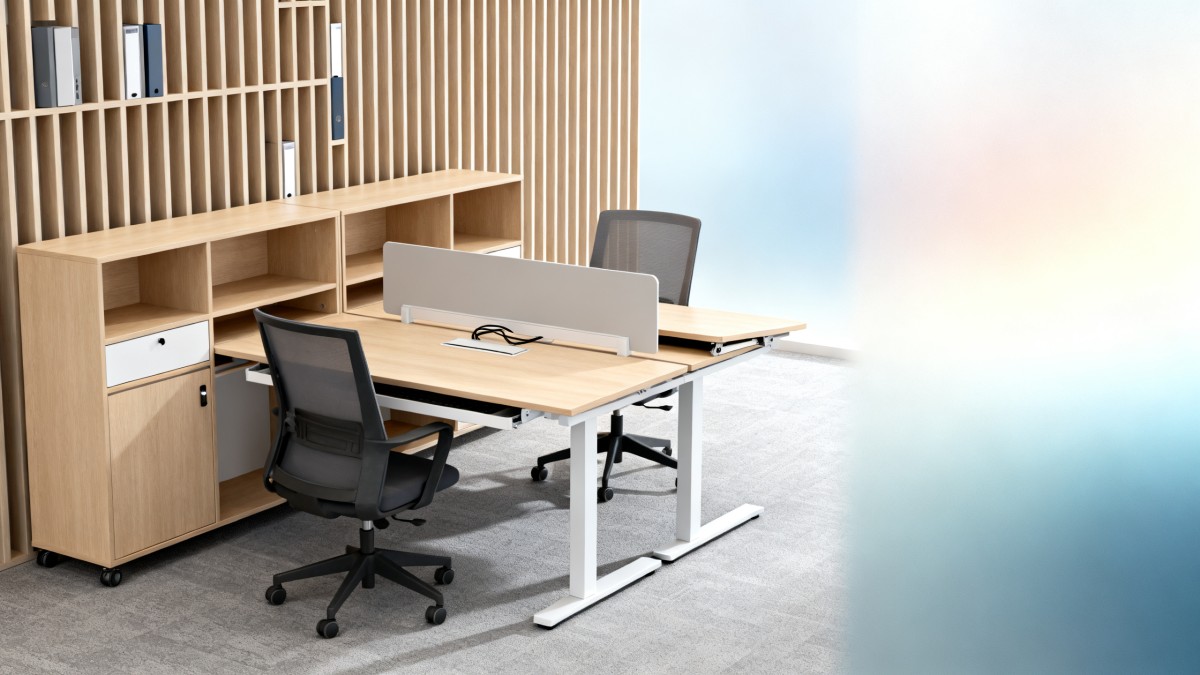
Many teams focus on desk count first and movement second. That is usually where layout problems begin. In compact offices, circulation is not only about comfort. It affects safety, cleaning access, cable management, visual order, collaboration flow, and day-to-day productivity. A narrow plan may fit more furniture on paper, yet create friction every hour of the workday.
For information researchers and business evaluators, the key question is simple: which space saving office furniture ideas reduce footprint without creating blocked paths, awkward chair pull-back zones, or dead corners? In most commercial fit-outs, planners should assess at least 3 movement layers: primary walkways, desk access paths, and shared-use zones around storage, printers, or meeting points.
Operators experience circulation issues immediately. If staff must twist around pedestal drawers, slide chairs sideways to leave a workstation, or queue near a storage wall, the office feels crowded even when floor area seems sufficient. Procurement teams should therefore evaluate furniture depth, opening direction, under-desk clearance, and reconfiguration ease over a typical 3–5 year use cycle.
G-BCE approaches these decisions from a benchmarking perspective. By comparing commercial furniture systems, smart workspace hardware, and compliance expectations across global markets, the platform helps buyers connect layout efficiency with real operational performance rather than showroom appearance alone.
What circulation-friendly planning usually includes
- Primary routes that remain clear during peak movement periods, especially near entrances, meeting rooms, and shared equipment.
- Workstations sized for seated work and chair movement, not just desktop dimensions.
- Storage solutions that minimize door swing conflict, protruding handles, and floor-level obstruction.
- Flexible modules that can be adjusted within 1–2 installation visits instead of requiring a full rebuild.
Which space saving office furniture ideas work best in real workplace scenarios?
Not every compact office needs the same strategy. A design studio, admin hub, showroom back office, and hybrid sales branch all use space differently. The best space saving office furniture ideas match traffic frequency, storage volume, privacy needs, and power access. Choosing by appearance alone often leads to oversized desks or undersized support furniture.
In offices with rotating attendance, benching systems and shared sit-stand desks often outperform large fixed executive stations. In task-heavy support teams, slim storage walls and mobile under-desk units may work better than full-height cabinets placed near circulation routes. In client-facing commercial environments, furniture must also support brand presentation and equipment integration.
A practical review usually starts with 4 scenario variables: number of daily users, average stay duration, required personal storage, and frequency of face-to-face collaboration. This framework gives procurement staff a clearer basis for comparing layout options and avoids overbuying square meters through poor furniture specification.
The table below summarizes common office scenarios, suitable furniture approaches, and circulation considerations that buyers can use during concept review, vendor comparison, or internal approval discussions.
This comparison shows that compact office planning is rarely solved by one product category. The strongest results usually come from combining 2–3 furniture types with a clear path hierarchy. That is where cross-sector benchmarking becomes valuable, especially when furniture must align with lighting, signage, digital hardware, and user behavior in a commercial environment.
Scenario-specific ideas worth considering
For high-density workstations
Choose desks with reduced depth where screen size and task type allow it, then move shared storage to perimeter zones. This often improves circulation more than shrinking desk width, because chair movement and passage clearance depend heavily on front-to-back space.
For meeting-heavy layouts
Use flip-top or nesting meeting tables that can be stored when not needed. In many offices, a room used only 2–3 times per week should not contain heavy fixed furniture that permanently reduces usable floor area.
For mixed retail-office environments
Prioritize furniture that supports both staff workflow and visual discipline. Compact back-office systems, integrated charging points, and concealed storage help maintain commercial presentation while preserving circulation for staff and visitors.
How to compare compact furniture options without sacrificing ergonomics
Space saving should not mean forcing people into uncomfortable postures or reducing access to tools. The most common mistake is selecting small furniture based only on footprint. Buyers should compare at least 5 dimensions: workstation depth, seated reach range, cable routing method, storage access type, and reconfiguration capability. Ergonomic value often comes from layout intelligence, not from larger furniture.
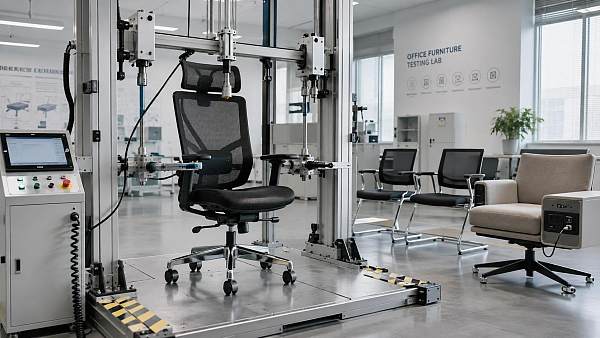
A second mistake is treating all compact furniture as equally commercial-ready. Some products look suitable for office use but are better aligned with residential settings. In B2B projects, durability, cleanability, spare-part continuity, and compliance references matter. For example, buyers often review alignment with standards such as BIFMA for furniture performance expectations or UL and CE where powered components are involved.
For procurement teams comparing suppliers, it helps to score each option across operational, spatial, and lifecycle criteria. This creates a more defendable decision process, especially when evaluating multiple regions, imported systems, or mixed-use developments where aesthetics and technical fit must be balanced.
The table below provides a practical comparison framework for common compact furniture categories used in circulation-sensitive office planning.
A structured comparison reduces the risk of false savings. A smaller desk that creates circulation bottlenecks or causes accessory spillover may cost more over time through rework, low user acceptance, and added storage purchases. G-BCE supports decision-makers by connecting furniture benchmarking with broader commercial performance requirements across supply chain and workspace modernization priorities.
A practical 4-step evaluation sequence
- Map user tasks by frequency: daily, weekly, and occasional. This prevents overdesigning low-use functions.
- Review furniture dimensions against actual circulation paths, not empty room measurements.
- Check compliance and commercial durability expectations for a 3–5 year operating horizon.
- Test reconfiguration logic before purchase, especially if the office may grow, shrink, or rotate teams each quarter.
What should buyers verify before ordering smart office furniture for compact layouts?
Smart office furniture can improve space efficiency, but only if the technology supports movement instead of complicating it. Height-adjustable desks, booking-enabled lockers, integrated charging rails, and sensor-supported occupancy tools can help compact offices work harder. Still, each added feature changes power needs, maintenance responsibility, and installation sequence.
Procurement teams should verify 6 key points before placing orders: electrical compatibility, cable routing, maintenance access, replacement parts, standards alignment, and lead time. For imported systems, lead times commonly range from 2–4 weeks for standard finishes and longer for customized modules, depending on quantity and regional compliance requirements.
Operators should also ask whether the smart feature reduces manual friction. A desk with complex controls or exposed cables may look advanced but create more daily inconvenience than value. In compact offices, simplicity matters. Features should reduce clutter, shorten task transitions, or improve seat sharing—not simply add another device to manage.
G-BCE’s cross-sector view is especially useful here. Office furniture decisions increasingly overlap with smart retail technology, lighting, signage, and facility systems. A compact office in a commercial environment often needs coordinated planning across these categories to avoid installation conflicts and hidden retrofit costs.
Buyer checklist for smart compact office systems
- Confirm whether powered desks or integrated modules require specific plug types, voltage review, or additional floor box planning.
- Check if maintenance can be completed in place within 30–60 minutes, or if the unit must be removed from the layout.
- Ask whether firmware, controllers, or charging parts can be replaced individually instead of replacing an entire workstation.
- Review finish durability and cleanability for commercial turnover, especially in mixed-use or client-visible spaces.
Compliance considerations
When furniture includes electrical or mechanical elements, buyers commonly check references to UL, CE, or relevant local market requirements, while structural furniture performance may be reviewed against common commercial expectations such as BIFMA-related criteria. Requirements vary by market, so early confirmation prevents redesign during the final approval stage.
Common mistakes, budget trade-offs, and FAQ for circulation-friendly office layouts
Budget pressure often pushes teams toward the smallest visible product, but the lowest upfront footprint is not always the best value. Common hidden costs include replacement storage, extra cable accessories, layout rework, and user dissatisfaction. A better approach is to compare total function per square meter over 12–36 months rather than focusing only on initial purchase price.
Another frequent mistake is placing all storage at desk level. This keeps documents close, but it also increases aisle congestion. In many small offices, moving 30%–50% of storage to shared vertical zones produces a better circulation outcome than reducing workstation count or sacrificing ergonomic seating.
Decision-makers should also avoid designing only for today’s headcount. If staff attendance patterns change within 6–12 months, fixed layouts may become inefficient very quickly. Modular systems, mobile units, and multipurpose collaboration furniture often provide a better long-term balance between density and movement.
Below are practical questions frequently raised by users, sourcing teams, and evaluators when reviewing space saving office furniture ideas that do not hurt circulation.
How do I know if a compact desk is too small for real office use?
Start with task type, monitor size, and accessory count. If staff use dual screens, paperwork, or fixed peripherals, a narrow desk may shift clutter into circulation zones. A proper review checks seated reach, chair movement, and where bags, docking devices, and cables will go during a full workday.
Are mobile storage units better than fixed cabinets?
They are often better for hybrid teams and phased reconfiguration, but only when parking positions are controlled. In tight offices, mobile units should not drift into shared paths. Fixed cabinets work well when archive needs are stable and wall zones can absorb the storage volume without blocking access.
What is a reasonable delivery planning window?
For standard commercial furniture, planning often begins 2–4 weeks before installation review, while custom finishes, powered desks, or integrated smart office furniture may require longer coordination. If compliance documents, samples, or regional power checks are needed, buyers should build additional review time into the schedule.
Can a small office still support ergonomic workplace wellness?
Yes, if wellness is treated as a layout outcome rather than a furniture size issue. Proper chair clearance, adjustable seating, monitor positioning, glare control, and unobstructed movement usually matter more than oversized desks. Good circulation supports micro-movement throughout the day, which is a practical part of ergonomic workplace wellness.
Why choose us for benchmarking, sourcing insight, and next-step planning
G-BCE supports more than product discovery. We help commercial decision-makers evaluate space saving office furniture ideas through a broader modernization lens that includes commercial fixtures, smart technology, supply chain visibility, lighting coordination, and sustainable material direction. That matters when a compact office must perform as part of a larger business ecosystem.
For researchers, we provide a structured view of what to compare and why it matters. For users and operators, we highlight layout choices that reduce friction in daily movement. For procurement teams, we support specification review, supplier comparison, and practical questions around lead time, compliance references, and customization feasibility. For business evaluators, we connect furniture decisions to long-term commercial usability.
You can contact us for targeted support on 5 core topics: parameter confirmation, product selection, delivery planning, custom layout solutions, and certification-related review. We can also help clarify sample needs, smart office furniture integration points, and key checkpoints for circulation-sensitive commercial spaces before quotation or sourcing discussions begin.
If you are comparing compact workstation systems, rethinking a hybrid office layout, or building a sourcing shortlist for an international project, reach out with your floor plan, target timeline, expected user count, and compliance priorities. That gives us a practical basis to discuss options, likely trade-offs, and the most suitable next step for your project.
News Recommendations
 How to select laboratory instruments for reproducible test results
![51a6ab95581761cc26f4318be6520c15]()
Aris Katos
Future of Carbide Coatings
 When does a sheet metal prototype reveal design flaws early?
![51a6ab95581761cc26f4318be6520c15]()
Aris Katos
Future of Carbide Coatings
 When PE air column bags reduce damage in e-commerce fulfillment
![51a6ab95581761cc26f4318be6520c15]()
Aris Katos
Future of Carbide Coatings
 How energy-efficient design reduces operating costs in retail lighting
![51a6ab95581761cc26f4318be6520c15]()
Aris Katos
Future of Carbide Coatings
 When commercial aluminum storefronts make sense for a retail renovation
![51a6ab95581761cc26f4318be6520c15]()
Aris Katos
Future of Carbide Coatings
 What makes LED lights durable in high-use commercial spaces?
![51a6ab95581761cc26f4318be6520c15]()
Aris Katos
Future of Carbide Coatings
 Which industry categories offer the strongest export potential in Latin America?
![51a6ab95581761cc26f4318be6520c15]()
Aris Katos
Future of Carbide Coatings
 How to choose an ultra bright waterproof window display for storefronts
![51a6ab95581761cc26f4318be6520c15]()
Aris Katos
Future of Carbide Coatings
 How to verify suppliers on a trade portal for global sourcing
![51a6ab95581761cc26f4318be6520c15]()
Aris Katos
Future of Carbide Coatings
 How RoHS requirements should be stated in product specifications
![51a6ab95581761cc26f4318be6520c15]()
Aris Katos
Future of Carbide Coatings
 What affects the lead time for custom retail counter displays?
![51a6ab95581761cc26f4318be6520c15]()
Aris Katos
Future of Carbide Coatings
 What consumer packaging USA importers need to verify before ordering
![51a6ab95581761cc26f4318be6520c15]()
Aris Katos
Future of Carbide Coatings
 How commercial spaces interiors shape customer dwell time
![51a6ab95581761cc26f4318be6520c15]()
Aris Katos
Future of Carbide Coatings
 How LED commercial lighting design reduces glare in retail spaces
![51a6ab95581761cc26f4318be6520c15]()
Aris Katos
Future of Carbide Coatings
 How industrial technology information improves RFID inventory accuracy
![51a6ab95581761cc26f4318be6520c15]()
Aris Katos
Future of Carbide Coatings
 When drip garden watering systems make more sense than sprinklers
![51a6ab95581761cc26f4318be6520c15]()
Aris Katos
Future of Carbide Coatings
 When category comparison improves sourcing for industrial applications
![51a6ab95581761cc26f4318be6520c15]()
Aris Katos
Future of Carbide Coatings
 Industrial application guidance for selecting the right LED lighting
![51a6ab95581761cc26f4318be6520c15]()
Aris Katos
Future of Carbide Coatings
 Which commercial architecture standards apply to European retail fit-outs?
![51a6ab95581761cc26f4318be6520c15]()
Aris Katos
Future of Carbide Coatings
 How to verify FDA requirements for maternity care products
![51a6ab95581761cc26f4318be6520c15]()
Aris Katos
Future of Carbide Coatings
 How to verify BPA-free claims for food-contact products
![51a6ab95581761cc26f4318be6520c15]()
Aris Katos
Future of Carbide Coatings
 When does a European wholesale supplier suit modular office projects?
![51a6ab95581761cc26f4318be6520c15]()
Aris Katos
Future of Carbide Coatings
 When consumer ecosystem solutions improve the in-store shopping journey
![51a6ab95581761cc26f4318be6520c15]()
Aris Katos
Future of Carbide Coatings
 How a commercial developers network can reduce site selection risk
![51a6ab95581761cc26f4318be6520c15]()
Aris Katos
Future of Carbide Coatings
 How clear purchasing specifications prevent costly supplier deviations
![51a6ab95581761cc26f4318be6520c15]()
Aris Katos
Future of Carbide Coatings
 What an ISTA drop test lab checks before your packaging ships
![51a6ab95581761cc26f4318be6520c15]()
Aris Katos
Future of Carbide Coatings
 Which commercial furniture standards apply to workplace seating?
![51a6ab95581761cc26f4318be6520c15]()
Aris Katos
Future of Carbide Coatings
 How to evaluate smart lighting module OEM compatibility before sampling
![51a6ab95581761cc26f4318be6520c15]()
Aris Katos
Future of Carbide Coatings
 How to assess whether sustainable technology delivers real impact
![51a6ab95581761cc26f4318be6520c15]()
Aris Katos
Future of Carbide Coatings
 How to assess an OEM supplier’s quality control before ordering
![51a6ab95581761cc26f4318be6520c15]()
Aris Katos
Future of Carbide Coatings
 How consumer ecosystem solutions data can improve retail personalization
![51a6ab95581761cc26f4318be6520c15]()
Aris Katos
Future of Carbide Coatings
 When does consumer packaging design justify a higher product price?
![51a6ab95581761cc26f4318be6520c15]()
Aris Katos
Future of Carbide Coatings
 Supermarket Fixture Installation: Planning Layouts, Wiring, and Handover
![51a6ab95581761cc26f4318be6520c15]()
Aris Katos
Future of Carbide Coatings
 Automated Lighting and Smart Lighting Control in Bergerac: Key Project Considerations
![51a6ab95581761cc26f4318be6520c15]()
Aris Katos
Future of Carbide Coatings
 Segment Streetlight Controllers: Choosing Control Modes for Urban Roads
![51a6ab95581761cc26f4318be6520c15]()
Aris Katos
Future of Carbide Coatings
 IEC 62471-2 Explained: How to Assess Photobiological Risks in LED Lighting
![51a6ab95581761cc26f4318be6520c15]()
Aris Katos
Future of Carbide Coatings
 Food Grade Packaging Requirements by Product Type, Temperature, and Contact Risk
![51a6ab95581761cc26f4318be6520c15]()
Aris Katos
Future of Carbide Coatings
 Food Packaging Compliance Checklist: Tests, Records, and Labeling Before Shipment
![51a6ab95581761cc26f4318be6520c15]()
Aris Katos
Future of Carbide Coatings
 NSF Food Packaging Standards: When Certification Matters for Commercial Food Use
![51a6ab95581761cc26f4318be6520c15]()
Aris Katos
Future of Carbide Coatings