Commercial Space Design Mistakes That Hurt Store Flow
Time
Click Count
Even the most attractive retail environment can fail when commercial space design overlooks how people actually move, browse, and buy. From poor fixture placement to lighting that disrupts visibility, small planning mistakes can quietly reduce efficiency, frustrate operators, and weaken the customer experience. Understanding these issues is the first step toward creating a commercial space that supports smoother flow, stronger engagement, and better business performance.
For operators, store managers, and implementation teams, the problem is rarely visual appeal alone. A space can look premium on opening day yet underperform within 30 to 90 days because circulation paths, fixture density, service access, and shopper decision points were not designed around real operational patterns.
This is where disciplined commercial space design matters. In global retail, hospitality, showroom, and mixed-use business environments, layout errors create hidden friction across staffing, replenishment, maintenance, safety, and conversion. The result is slower movement, higher labor effort, missed merchandising opportunities, and reduced customer dwell value.
Drawing on the benchmarking perspective promoted by G-BCE, this article examines the most common design mistakes that hurt store flow, why they happen, and how operators can correct them with measurable, standards-aware planning.
Why Store Flow Fails Even in Well-Finished Commercial Spaces
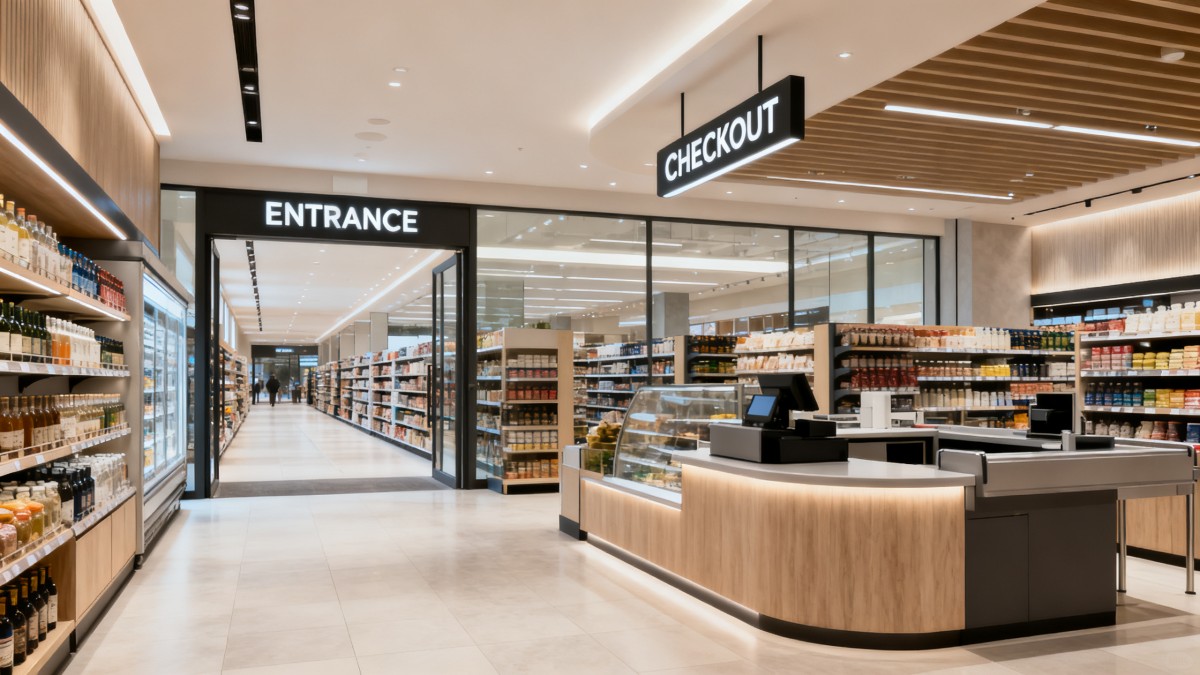
Many underperforming sites do not fail because of poor branding or low-quality materials. They fail because commercial space design often prioritizes visual symmetry over movement logic. When staff and customers compete for the same aisle, when displays block sightlines, or when checkout zones create bottlenecks, flow breaks down quickly.
In most retail and commercial environments, operators can identify flow issues within the first 2 to 6 weeks of live use. Typical warning signs include queues longer than 3 to 5 minutes at peak periods, replenishment tasks interrupting customer movement, and product zones that receive high traffic but low engagement.
The Cost of Ignoring Movement Patterns
When circulation planning is weak, every department absorbs the cost. Frontline staff take longer routes, visual merchandising requires frequent resets, and cleaning teams lose after-hours efficiency. In compact footprints, even a 200 to 300 mm fixture overhang can narrow access enough to affect stroller passage, basket handling, or stock cart movement.
For operators, this translates into slower service cycles and more manual correction. Instead of supporting business performance, the space becomes something staff must work around. Good commercial space design reduces these hidden frictions before the site opens, not after complaints begin.
Common Operational Symptoms
- Entry zones feel crowded within 10 to 15 minutes of peak traffic.
- Featured displays draw attention but block direct routes to high-demand categories.
- Staff require 2 or more extra handling steps to restock core items.
- Checkout, pickup, and return functions overlap in the same 3 to 5 meter zone.
- Customers abandon deeper areas of the store because wayfinding weakens after the first visual impression.
High-Impact Flow Mistakes at a Glance
The table below summarizes recurring mistakes seen across retail chains, branded showrooms, and commercial developments. These are not theoretical issues. They directly affect movement quality, staff productivity, and category exposure.
A pattern stands out: the most damaging mistakes are usually spatial conflicts, not decorative ones. Operators should therefore assess flow based on route efficiency, visibility, and service access rather than relying only on visual approval during design review.
The Most Common Commercial Space Design Mistakes That Hurt Store Flow
Across sectors, several layout problems appear again and again. Each one seems manageable in isolation, but together they create a chain reaction that weakens browsing, stocking, queue control, and customer decision-making. Understanding these mistakes helps operators intervene before costly retrofits become necessary.
Mistake 1: Poor Entry and Decompression Planning
The first 3 to 5 meters after entry should help visitors adjust to the environment. When this zone is crowded with product towers, digital kiosks, or directional clutter, customers cannot scan the store naturally. They either hesitate or move past key messages without processing them.
For operators, an overloaded entrance also creates security blind spots and cleaning challenges. In compact stores, it is usually better to reserve the initial landing area for orientation, brand cues, and one strong focal message rather than multiple competing selling points.
Mistake 2: Fixture Density That Looks Premium but Moves Poorly
A common commercial space design error is assuming more fixtures create more selling opportunities. In practice, excess density reduces line of sight, shortens natural pause zones, and limits maneuverability for both customers and staff. This is especially risky in fashion, beauty, electronics, and specialty retail formats.
As a practical rule, operators should distinguish between display density and accessibility. A fixture plan can increase stock-facing count by 15% while reducing effective movement quality if pathways become visually or physically compressed.
What to check on site
- Can 2 customers pass comfortably without turning sideways?
- Can a stock cart move during trading hours without forcing route blockage?
- Are best-selling categories visible from at least 2 approach points?
- Do low fixtures transition to higher fixtures in a way that preserves sightlines?
Mistake 3: Lighting That Works for Mood but Not for Navigation
Lighting is often treated as a finishing layer, yet it strongly influences flow. Excess contrast between focal displays and circulation routes can create dark gaps that reduce perceived accessibility. Glare near reflective packaging, screens, or polished surfaces can also slow browsing by making product reading uncomfortable.
In operator-led environments, balanced lighting should support three functions at once: orientation, product evaluation, and task safety. That usually means planning ambient and accent layers together instead of adding spotlights only after fixture placement is finalized.
Mistake 4: Checkout and Service Zones Without Queue Logic
One of the most expensive mistakes in commercial space design is underestimating transaction space. If the payment counter, return station, click-and-collect point, and customer help desk all share one cluster, queues overlap and block adjacent merchandising. Even a 4-minute peak queue can discourage browsing in surrounding zones.
A better approach is to separate customer intent. Buying, collecting, and resolving issues are different actions with different dwell times. Designing for these behaviors can reduce front-end congestion and make staffing allocation easier during peak and off-peak cycles.
Mistake 5: Back-of-House Access That Interferes With the Sales Floor
Operators often inherit layouts where stock doors, waste handling paths, and replenishment routes cut directly through customer areas. This creates visual disruption and safety concerns, particularly when deliveries coincide with midday trading. A strong front-of-house concept cannot compensate for a weak service path strategy.
Where full redesign is not possible, phased adjustments can still help. Reassigning replenishment windows, repositioning mobile storage, and improving route separation often brings noticeable gains within 2 to 3 weeks.
How Operators Can Evaluate and Improve Store Flow
Improving store flow does not always require a full renovation. In many cases, operators can diagnose 70% of movement problems through structured observation, staff feedback, and simple path testing. The goal is to identify where spatial intent and actual behavior no longer match.
A 5-Step Practical Review Process
- Map customer routes during 3 peak periods and 2 off-peak periods.
- Track queue formation time, spillover distance, and service point overlap.
- Check replenishment routes against active customer traffic windows.
- Review fixture heights, aisle widths, and sightlines by category zone.
- Test adjustments in one section first before wider rollout.
This review can be completed in 7 to 14 days for a single site. For chain operators, repeating the same checklist across 5 to 10 locations quickly reveals whether the issue is local execution or a broader prototype problem.
Operational Benchmarks Worth Using
Not every commercial format needs the same dimensions, but operators still need baseline ranges. The table below outlines practical benchmarks that can guide audits, supplier discussions, and redesign decisions without overcommitting to one format-specific standard.
These ranges are not rigid rules, but they provide a practical starting point. In commercial space design, flow improves when dimensions are linked to use cases such as baskets, trolleys, accessibility, replenishment timing, and visibility rather than visual preference alone.
When to Adjust Layout vs. When to Rebuild
Operators should avoid defaulting to expensive reconstruction if a flow issue can be solved through zoning changes. If the problem comes from movable fixtures, queue management, or product regrouping, a low-disruption intervention may deliver results within 1 to 4 weeks. Full rebuilds are more appropriate when service routes, structural columns, utility placement, or checkout position fundamentally conflict with customer circulation.
This is where a data-led benchmark approach becomes valuable. Reviewing fixture systems, lighting plans, POS placement, signage hierarchy, and material durability together helps decision-makers avoid fixing one problem while creating another.
What Better Commercial Space Design Looks Like in Practice
Strong commercial space design is not only about avoiding mistakes. It builds an environment where layout, fixtures, technology, and service operations work as one system. For operators, the best spaces are usually the ones that feel easy to run, easy to restock, and easy for customers to understand within the first 30 seconds.
Key Design Priorities for Operators and Sourcing Teams
- Specify fixtures with durability and service clearance in mind, not just display value.
- Align signage, lighting, and category planning before installation begins.
- Confirm compatibility between furniture, POS hardware, and cable management.
- Review material choices for cleaning frequency, wear zones, and sustainability goals.
- Use mockups or pilot zones to validate movement before chain-wide deployment.
Why Cross-Sector Benchmarking Matters
Modern commercial environments now combine physical retail, digital touchpoints, modular fixtures, and sustainability requirements. That means store flow cannot be solved by layout alone. Operators need a broader view that connects furniture systems, smart retail technology, lighting performance, packaging interaction, and supply chain practicality.
G-BCE’s cross-sector perspective is especially relevant here. By comparing commercial hardware and environmental components against internationally recognized frameworks such as UL, CE, and BIFMA, project teams can make more informed choices about function, safety, durability, and user experience across the full commercial ecosystem.
A Better Outcome for Daily Operations
When commercial space design supports real movement patterns, daily performance improves in visible ways. Staff complete tasks with fewer detours. Customers navigate more confidently. Checkout areas remain legible under pressure. Merchandising becomes easier to maintain. Over time, these operational gains often matter more than any single decorative feature.
The most effective spaces are not the busiest-looking ones. They are the ones where traffic, product visibility, service functions, and replenishment all work together without constant manual correction.
If your team is reviewing a new fit-out, updating a chain prototype, or correcting underperforming store flow, a structured assessment of commercial space design can prevent costly layout errors and improve operational results across the full site lifecycle. To explore benchmark-driven solutions across fixtures, smart retail systems, lighting, and supply chain integration, contact G-BCE to get a tailored plan, discuss project details, and discover more practical solutions for modern commercial environments.
News Recommendations
 How to select laboratory instruments for reproducible test results
![51a6ab95581761cc26f4318be6520c15]()
Aris Katos
Future of Carbide Coatings
 When does a sheet metal prototype reveal design flaws early?
![51a6ab95581761cc26f4318be6520c15]()
Aris Katos
Future of Carbide Coatings
 When PE air column bags reduce damage in e-commerce fulfillment
![51a6ab95581761cc26f4318be6520c15]()
Aris Katos
Future of Carbide Coatings
 How energy-efficient design reduces operating costs in retail lighting
![51a6ab95581761cc26f4318be6520c15]()
Aris Katos
Future of Carbide Coatings
 When commercial aluminum storefronts make sense for a retail renovation
![51a6ab95581761cc26f4318be6520c15]()
Aris Katos
Future of Carbide Coatings
 What makes LED lights durable in high-use commercial spaces?
![51a6ab95581761cc26f4318be6520c15]()
Aris Katos
Future of Carbide Coatings
 Which industry categories offer the strongest export potential in Latin America?
![51a6ab95581761cc26f4318be6520c15]()
Aris Katos
Future of Carbide Coatings
 How to choose an ultra bright waterproof window display for storefronts
![51a6ab95581761cc26f4318be6520c15]()
Aris Katos
Future of Carbide Coatings
 How to verify suppliers on a trade portal for global sourcing
![51a6ab95581761cc26f4318be6520c15]()
Aris Katos
Future of Carbide Coatings
 How RoHS requirements should be stated in product specifications
![51a6ab95581761cc26f4318be6520c15]()
Aris Katos
Future of Carbide Coatings
 What affects the lead time for custom retail counter displays?
![51a6ab95581761cc26f4318be6520c15]()
Aris Katos
Future of Carbide Coatings
 What consumer packaging USA importers need to verify before ordering
![51a6ab95581761cc26f4318be6520c15]()
Aris Katos
Future of Carbide Coatings
 How commercial spaces interiors shape customer dwell time
![51a6ab95581761cc26f4318be6520c15]()
Aris Katos
Future of Carbide Coatings
 How LED commercial lighting design reduces glare in retail spaces
![51a6ab95581761cc26f4318be6520c15]()
Aris Katos
Future of Carbide Coatings
 How industrial technology information improves RFID inventory accuracy
![51a6ab95581761cc26f4318be6520c15]()
Aris Katos
Future of Carbide Coatings
 When drip garden watering systems make more sense than sprinklers
![51a6ab95581761cc26f4318be6520c15]()
Aris Katos
Future of Carbide Coatings
 When category comparison improves sourcing for industrial applications
![51a6ab95581761cc26f4318be6520c15]()
Aris Katos
Future of Carbide Coatings
 Industrial application guidance for selecting the right LED lighting
![51a6ab95581761cc26f4318be6520c15]()
Aris Katos
Future of Carbide Coatings
 Which commercial architecture standards apply to European retail fit-outs?
![51a6ab95581761cc26f4318be6520c15]()
Aris Katos
Future of Carbide Coatings
 How to verify FDA requirements for maternity care products
![51a6ab95581761cc26f4318be6520c15]()
Aris Katos
Future of Carbide Coatings
 How to verify BPA-free claims for food-contact products
![51a6ab95581761cc26f4318be6520c15]()
Aris Katos
Future of Carbide Coatings
 When does a European wholesale supplier suit modular office projects?
![51a6ab95581761cc26f4318be6520c15]()
Aris Katos
Future of Carbide Coatings
 When consumer ecosystem solutions improve the in-store shopping journey
![51a6ab95581761cc26f4318be6520c15]()
Aris Katos
Future of Carbide Coatings
 How a commercial developers network can reduce site selection risk
![51a6ab95581761cc26f4318be6520c15]()
Aris Katos
Future of Carbide Coatings
 How clear purchasing specifications prevent costly supplier deviations
![51a6ab95581761cc26f4318be6520c15]()
Aris Katos
Future of Carbide Coatings
 What an ISTA drop test lab checks before your packaging ships
![51a6ab95581761cc26f4318be6520c15]()
Aris Katos
Future of Carbide Coatings
 Which commercial furniture standards apply to workplace seating?
![51a6ab95581761cc26f4318be6520c15]()
Aris Katos
Future of Carbide Coatings
 How to evaluate smart lighting module OEM compatibility before sampling
![51a6ab95581761cc26f4318be6520c15]()
Aris Katos
Future of Carbide Coatings
 How to assess whether sustainable technology delivers real impact
![51a6ab95581761cc26f4318be6520c15]()
Aris Katos
Future of Carbide Coatings
 How to assess an OEM supplier’s quality control before ordering
![51a6ab95581761cc26f4318be6520c15]()
Aris Katos
Future of Carbide Coatings
 How consumer ecosystem solutions data can improve retail personalization
![51a6ab95581761cc26f4318be6520c15]()
Aris Katos
Future of Carbide Coatings
 When does consumer packaging design justify a higher product price?
![51a6ab95581761cc26f4318be6520c15]()
Aris Katos
Future of Carbide Coatings
 Supermarket Fixture Installation: Planning Layouts, Wiring, and Handover
![51a6ab95581761cc26f4318be6520c15]()
Aris Katos
Future of Carbide Coatings
 Automated Lighting and Smart Lighting Control in Bergerac: Key Project Considerations
![51a6ab95581761cc26f4318be6520c15]()
Aris Katos
Future of Carbide Coatings
 Segment Streetlight Controllers: Choosing Control Modes for Urban Roads
![51a6ab95581761cc26f4318be6520c15]()
Aris Katos
Future of Carbide Coatings
 IEC 62471-2 Explained: How to Assess Photobiological Risks in LED Lighting
![51a6ab95581761cc26f4318be6520c15]()
Aris Katos
Future of Carbide Coatings
 Food Grade Packaging Requirements by Product Type, Temperature, and Contact Risk
![51a6ab95581761cc26f4318be6520c15]()
Aris Katos
Future of Carbide Coatings
 Food Packaging Compliance Checklist: Tests, Records, and Labeling Before Shipment
![51a6ab95581761cc26f4318be6520c15]()
Aris Katos
Future of Carbide Coatings
 NSF Food Packaging Standards: When Certification Matters for Commercial Food Use
![51a6ab95581761cc26f4318be6520c15]()
Aris Katos
Future of Carbide Coatings