POS Terminals for Busy Stores: What Fails First
Time
Click Count
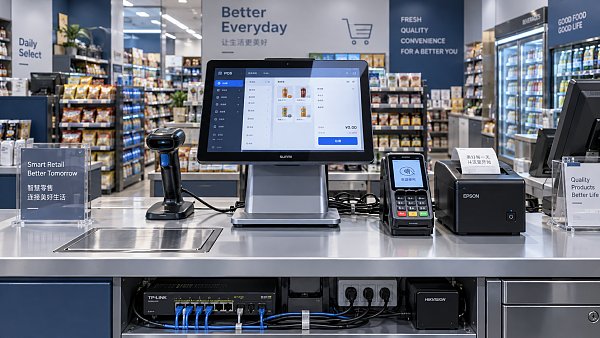
In busy retail environments, POS terminals absorb constant physical input, payment traffic, printing cycles, and network handoffs. Failures rarely begin with the main processor. They usually start at exposed components.
For service planning, the first weak point matters more than the final breakdown. It reveals usage intensity, cleaning habits, cable stress, heat load, and whether a POS terminals fleet fits the store scenario.
Across modern commercial spaces, G-BCE benchmarking shows one clear pattern. Reliability depends less on brochure specifications and more on how POS terminals match transaction rhythm, operator behavior, and maintenance discipline.
In high-traffic checkout lanes, the first failures are usually touch, swipe, and print
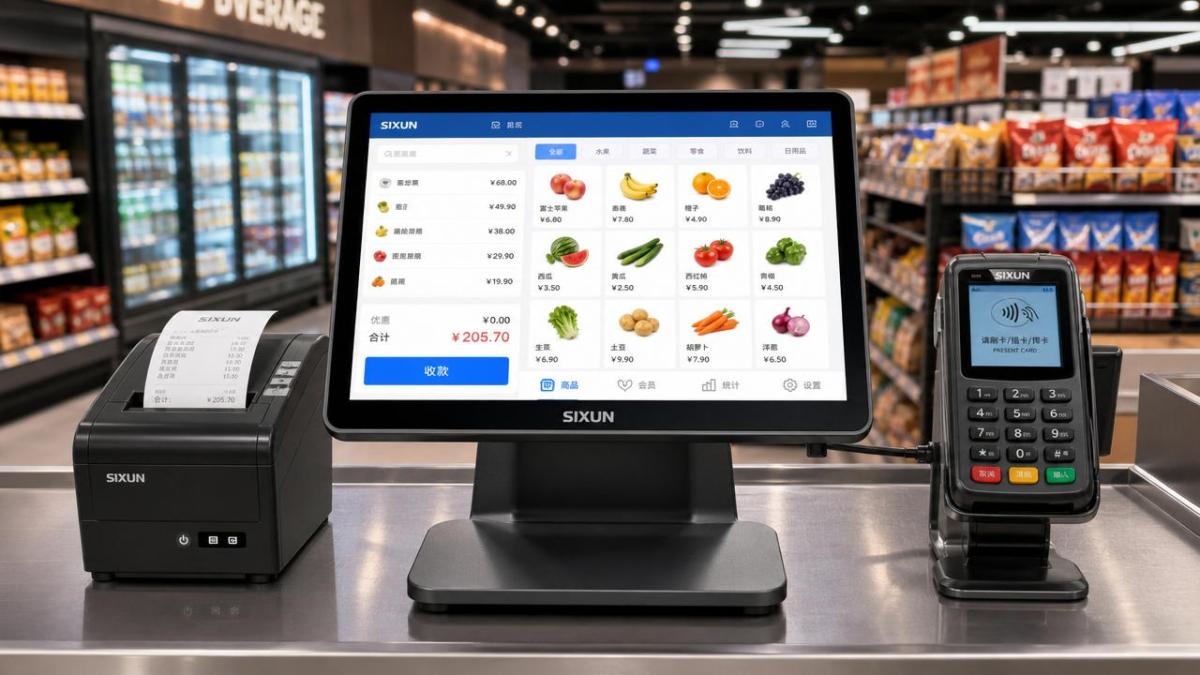
Large-format grocery, convenience, and discount stores create the harshest daily cycle for POS terminals. Operators tap fast, customers queue closely, and peripherals run with almost no idle time.
In this setting, touchscreens often show the first visible decline. Dead zones, reduced sensitivity, and edge drift appear before total failure. Frequent impacts and aggressive cleaning accelerate the problem.
Card readers are another early failure point. Insert slots collect dust, contact pins wear down, and repeated cable movement weakens internal joints. Symptoms include slow reads, retries, and intermittent disconnects.
Thermal printers also fail early in busy lanes. Paper dust, overheated print heads, and cutter jams create a service burden. When receipts are mandatory, even a small printer issue quickly disrupts sales flow.
What these failures usually indicate
- Interface parts are under-specified for transaction volume.
- Cleaning chemicals do not match screen and housing materials.
- Cable routing allows repeated flexing near connectors.
- Printer duty cycle exceeds realistic thermal limits.
In hospitality and food service, liquid exposure and heat often fail first
Restaurants, cafés, bakeries, and bars stress POS terminals differently. The issue is not only transaction count. It is the combination of steam, grease, spills, rapid wiping, and long operating hours.
Here, button membranes, side ports, and power connections often fail before the display. Small liquid ingress can cause unstable charging, ghost input, or random restarts.
Heat also matters. POS terminals placed beside ovens, hot lamps, or enclosed counters lose reliability faster. Internal fans clog. Passive cooling becomes less effective. Battery swelling may appear in mobile units.
Barcode scanners integrated with POS terminals can also become weak points. Window scratching, grease film, and impact damage reduce read speed, creating delays that look like software issues.
Core judgment point for this scenario
If failures cluster around ports and power stability, environmental sealing is likely insufficient. If print or scan speed drops first, contamination control may be the real maintenance priority.
In apparel and specialty retail, network and peripheral pairing fail before hardware wears out
Apparel, cosmetics, and specialty stores often run cleaner counters and lower thermal stress. Yet POS terminals still fail, just in less obvious ways. The first problem is frequently connectivity.
Wi-Fi roaming issues, Bluetooth pairing drops, and delayed sync with handheld scanners can interrupt checkout. To frontline staff, the POS terminals feel broken, even when the hardware remains healthy.
Docking contacts on mobile POS terminals also wear early in this scenario. Frequent undocking for assisted selling creates abrasion. Charging becomes inconsistent, leading to mid-shift battery gaps.
Customer-facing displays can become another weak link. Repeated swivel movement loosens hinges and strains video cables. The result is flicker, blank screens, or unstable touch response.
What to watch in service records
- Repeated “no fault found” returns often point to network design.
- Battery complaints may actually begin with docking wear.
- Display complaints may come from hinge fatigue, not panels.
Different scenarios create different failure priorities for POS terminals
The same POS terminals model can behave very differently across store formats. That is why generic reliability claims are weak. Failure sequence is more useful than raw warranty duration.
How to match POS terminals to each operating environment
Selecting POS terminals by processor speed alone misses the real reliability factors. Scenario fit should include ingress resistance, connector protection, print duty cycle, cable strain relief, and service accessibility.
Practical adaptation checklist
- Map transaction peaks by hour, not just daily volume.
- Record cleaning agents used on screens and housings.
- Check whether receipt printing is legally or operationally required.
- Review counter heat, moisture, dust, and splash exposure.
- Inspect cable bend points and docking cycles every quarter.
- Separate network faults from terminal hardware faults in logs.
For benchmark-driven environments, component-level validation matters. G-BCE recommends checking whether POS terminals are aligned with recognized safety and performance references such as UL and CE, plus verified peripheral compatibility.
Common misjudgments that shorten POS terminals life
One common mistake is replacing the full terminal after a recurring peripheral issue. If the printer, reader, or dock is the actual weak point, full-unit replacement wastes budget and leaves root causes unresolved.
Another mistake is blaming software for every intermittent failure. Many “system freezes” begin with unstable power, failing SSD connections, or overloaded thermal conditions inside compact POS terminals.
Cleaning is also misunderstood. Strong solvents may improve hygiene perception while damaging coatings, adhesives, and plastics. In high-contact commercial spaces, approved cleaning protocols are part of reliability engineering.
A further blind spot is ignoring small delays. A terminal that needs one extra tap, one extra card insert, or one reboot per shift is already signaling accelerated wear.
The next step is to track failure order, not just failure count
The best maintenance programs do not only count incidents. They identify which component fails first in each scenario. That sequence shows whether POS terminals are mismatched, under-protected, or simply overdue for preventive service.
A practical starting point is simple. Group service tickets by store format, first failed component, environmental condition, and peripheral type. Within weeks, patterns usually become visible.
From there, testing and sourcing become more precise. Screens can be upgraded for impact resistance. Printers can be reassigned by receipt load. Card readers, docks, and cables can be standardized for faster replacement.
For commercial environments seeking resilient performance, POS terminals should be judged by scenario durability, not only feature lists. The first failure tells the truth. The right response turns that signal into longer service life.
News Recommendations
 How to assess demand forecasts in a lighting intelligence report
![51a6ab95581761cc26f4318be6520c15]()
Aris Katos
Future of Carbide Coatings
 Billerud推出PharmaKraft纤维基医药包装材料
![51a6ab95581761cc26f4318be6520c15]()
Aris Katos
Future of Carbide Coatings
 How to assess supplier reliability in global supply chain sourcing
![51a6ab95581761cc26f4318be6520c15]()
Aris Katos
Future of Carbide Coatings
 Omdia Forecasts 11.6% CAGR for Global LED Video Display Market in 2026–2030
![51a6ab95581761cc26f4318be6520c15]()
Aris Katos
Future of Carbide Coatings
 How to verify an LFGB testing laboratory's accreditation scope
![51a6ab95581761cc26f4318be6520c15]()
Aris Katos
Future of Carbide Coatings
 How to assess a workplace interior supplier's installation scope
![51a6ab95581761cc26f4318be6520c15]()
Aris Katos
Future of Carbide Coatings
 What records are needed for an ISO 9001 furniture factory audit?
![51a6ab95581761cc26f4318be6520c15]()
Aris Katos
Future of Carbide Coatings
 How to choose AI marketing tools that work with your existing CRM
![51a6ab95581761cc26f4318be6520c15]()
Aris Katos
Future of Carbide Coatings
 Do freight costs erase savings when buying retail fixtures wholesale?
![51a6ab95581761cc26f4318be6520c15]()
Aris Katos
Future of Carbide Coatings
 Can OEM retail shelf display screens work with your existing CMS?
![51a6ab95581761cc26f4318be6520c15]()
Aris Katos
Future of Carbide Coatings
 How heat buildup affects OEM retail shelf LCD screen reliability
![51a6ab95581761cc26f4318be6520c15]()
Aris Katos
Future of Carbide Coatings
 How to check whether an OEM retail shelf screen fits existing shelving
![51a6ab95581761cc26f4318be6520c15]()
Aris Katos
Future of Carbide Coatings
 What brightness should an OEM shelf LCD screen have for retail use?
![51a6ab95581761cc26f4318be6520c15]()
Aris Katos
Future of Carbide Coatings
 Can smart retail IT solutions for CPG work with legacy POS systems?
![51a6ab95581761cc26f4318be6520c15]()
Aris Katos
Future of Carbide Coatings
 What permit approvals belong in a commercial fitout planning checklist?
![51a6ab95581761cc26f4318be6520c15]()
Aris Katos
Future of Carbide Coatings
 What Selection Criteria Matter Most for Commercial Lighting?
![51a6ab95581761cc26f4318be6520c15]()
Aris Katos
Future of Carbide Coatings
 How Do You Apply Sustainability Standards to a Retail Renovation?
![51a6ab95581761cc26f4318be6520c15]()
Aris Katos
Future of Carbide Coatings
 Which Technical Factors Matter When Comparing Smart Retail Hardware?
![51a6ab95581761cc26f4318be6520c15]()
Aris Katos
Future of Carbide Coatings
 Does Data Transparency Matter When Selecting Consumer Goods Suppliers?
![51a6ab95581761cc26f4318be6520c15]()
Aris Katos
Future of Carbide Coatings
 How Does Commercial Design Differ from Interior Decoration?
![51a6ab95581761cc26f4318be6520c15]()
Aris Katos
Future of Carbide Coatings
 How Long Does It Take to Verify a Commercial Furniture Supplier?
![51a6ab95581761cc26f4318be6520c15]()
Aris Katos
Future of Carbide Coatings
 How to verify compostability claims from a bubble mailer manufacturer
![51a6ab95581761cc26f4318be6520c15]()
Aris Katos
Future of Carbide Coatings
 Will commercial smart infrastructure solutions work with legacy systems?
![51a6ab95581761cc26f4318be6520c15]()
Aris Katos
Future of Carbide Coatings
 How to verify a preschool furniture manufacturer's safety standards
![51a6ab95581761cc26f4318be6520c15]()
Aris Katos
Future of Carbide Coatings
 A technical comparison of semiconductor processes for power devices
![51a6ab95581761cc26f4318be6520c15]()
Aris Katos
Future of Carbide Coatings
 How to verify that a BIFMA ergonomic chair meets the standard
![51a6ab95581761cc26f4318be6520c15]()
Aris Katos
Future of Carbide Coatings
 How to use a CRI value chart when choosing LED lighting
![51a6ab95581761cc26f4318be6520c15]()
Aris Katos
Future of Carbide Coatings
 How to compare hotel aroma diffuser wholesale options by coverage area
![51a6ab95581761cc26f4318be6520c15]()
Aris Katos
Future of Carbide Coatings
 How to prevent O-rings and seals from failing in food equipment
![51a6ab95581761cc26f4318be6520c15]()
Aris Katos
Future of Carbide Coatings
 How to compare commercial linear light wholesale quotes accurately
![51a6ab95581761cc26f4318be6520c15]()
Aris Katos
Future of Carbide Coatings
 How to verify international standards compliance for Middle East exports
![51a6ab95581761cc26f4318be6520c15]()
Aris Katos
Future of Carbide Coatings
 How to select laboratory instruments for reproducible test results
![51a6ab95581761cc26f4318be6520c15]()
Aris Katos
Future of Carbide Coatings
 When does a sheet metal prototype reveal design flaws early?
![51a6ab95581761cc26f4318be6520c15]()
Aris Katos
Future of Carbide Coatings
 When PE air column bags reduce damage in e-commerce fulfillment
![51a6ab95581761cc26f4318be6520c15]()
Aris Katos
Future of Carbide Coatings
 How energy-efficient design reduces operating costs in retail lighting
![51a6ab95581761cc26f4318be6520c15]()
Aris Katos
Future of Carbide Coatings
 When commercial aluminum storefronts make sense for a retail renovation
![51a6ab95581761cc26f4318be6520c15]()
Aris Katos
Future of Carbide Coatings
 What makes LED lights durable in high-use commercial spaces?
![51a6ab95581761cc26f4318be6520c15]()
Aris Katos
Future of Carbide Coatings
 Which industry categories offer the strongest export potential in Latin America?
![51a6ab95581761cc26f4318be6520c15]()
Aris Katos
Future of Carbide Coatings
 How to choose an ultra bright waterproof window display for storefronts
![51a6ab95581761cc26f4318be6520c15]()
Aris Katos
Future of Carbide Coatings