Monitor Stands: Key Features That Improve Desk Ergonomics
Time
Click Count
Monitor stands are more than simple desk accessories—they are essential tools for improving posture, reducing neck strain, and creating a more efficient workspace. For users who spend long hours at a desk, understanding which features truly support ergonomics can make a measurable difference in daily comfort and productivity. This article explores the key design elements that make monitor stands a smart investment for healthier desk setups.
Why do monitor stands matter so much in modern workspaces?
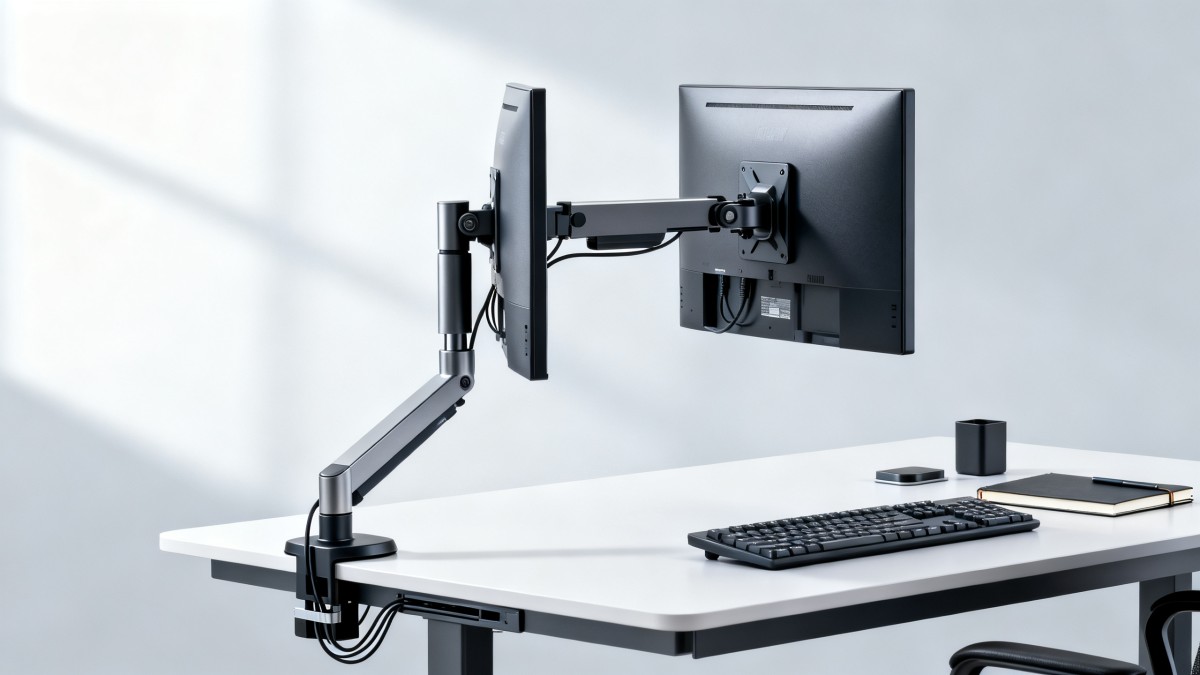
In commercial offices, retail back offices, service counters, control rooms, and hybrid workstations, poor monitor height is one of the most common causes of daily discomfort. Users often adapt to the desk instead of the desk adapting to the user.
That is why monitor stands have become a practical ergonomic upgrade rather than a cosmetic add-on. A well-designed stand helps align the screen with natural eye level, supports a neutral neck angle, and frees usable desk space for keyboards, documents, scanners, and accessories.
From the perspective of G-BCE, monitor stands also sit inside a broader commercial furniture and fixtures decision. They affect operator comfort, workstation efficiency, visual consistency, maintenance access, and compatibility with international sourcing standards used across global fit-out programs.
- They reduce the need to bend the neck downward for long periods, which is especially important for operators working six to ten hours daily.
- They improve desk organization by creating vertical space under or around the display.
- They support multi-device environments where a monitor must work alongside POS units, task lighting, label printers, or laptops.
- They help companies standardize ergonomic workstations across multiple branches or commercial locations.
Which key features of monitor stands actually improve ergonomics?
Not every monitor stand delivers real ergonomic value. Users often focus on appearance first, yet the most important features are mechanical range, stability, adaptability, and how well the stand supports different body sizes and work tasks.
1. Height adjustment range
Height adjustability is the core feature. The ideal top line of the screen usually sits at or slightly below eye level. A fixed stand may work for one person but fail in shared desks, hot-desking zones, or multi-shift operations.
2. Tilt and viewing angle control
Tilt adjustment reduces glare and helps users maintain a natural viewing position. It is particularly useful in retail offices and mixed-light commercial environments where overhead lighting and daylight can change across the day.
3. Swivel and rotation
A swivel function supports collaborative work and screen sharing. Rotation can also be useful for vertical document review, coding, design work, and long spreadsheet tasks.
4. Load capacity and structural stability
A stand must support the monitor weight without wobble. Instability leads to eye fatigue and frustration, especially when users type quickly, adjust nearby equipment, or operate on counters with constant customer interaction.
5. Desk footprint and space efficiency
Compact footprints matter in dense work environments. Some monitor stands use a wide base, while others rely on clamp or grommet mounting. The right choice depends on desk depth, cable routes, and whether under-monitor storage is needed.
6. Cable management
Cable management is often underestimated. It improves safety, appearance, and maintenance speed. In commercial settings, exposed cables can interfere with peripherals or create a poor brand impression.
The table below summarizes the most important monitor stands features and how each one affects desk ergonomics in real user environments.
For most users, the biggest ergonomic gains come from combining height range, stable support, and smooth angle control. Premium finishes matter less if the stand cannot hold the screen comfortably throughout the workday.
Which types of monitor stands fit different application scenarios?
Different environments demand different monitor stands. A reception desk, a purchasing workstation, a design office, and a retail operations station may all use monitors, but their ergonomic priorities are not identical.
Single-user office desks
In a standard office setup, a height-adjustable stand with tilt is often enough. Users benefit from simple positioning and better document visibility without overcomplicating the workstation.
Shared desks and flexible workstations
In shared environments, adjustment speed becomes critical. Users should be able to reposition the monitor quickly between shifts without tools or technical support.
Retail support and POS back-office stations
These workstations often have limited desk depth and multiple connected devices. Compact monitor stands with neat cable routing and solid stability perform better than bulky decorative bases.
Dual-screen productivity tasks
Operators handling analytics, inventory control, planning, or customer service dashboards may need dual monitor stands. Alignment consistency between screens becomes just as important as individual height adjustment.
The following comparison helps users match monitor stands to the workstation scenario instead of choosing only by price or visual design.
This scenario-based view is especially useful for commercial buyers managing multiple furniture categories. G-BCE emphasizes this method because workstation performance depends on context, not on product labels alone.
How should users and operators evaluate monitor stands before purchase?
Many buyers focus on price, then discover fit problems after delivery. A better approach is to evaluate the workstation, the user profile, and the monitor itself before selecting a stand.
- Measure the monitor size and weight, including accessories such as mini-PC brackets or webcams if they affect balance.
- Check whether the screen supports standard mounting patterns commonly used in commercial environments.
- Review desk thickness, edge access, and cable routes before choosing between a freestanding, clamp, or grommet system.
- Identify whether the desk is used by one person or many. Shared usage usually requires easier adjustment and stronger durability.
- Consider nearby devices. A stand that works in isolation may interfere with lighting, document holders, barcode equipment, or partition panels.
Users should also ask practical questions that are often missed during early procurement. How easy is cleaning? Can the monitor be repositioned without drifting? Will the stand still feel stable after repeated daily adjustments?
For organizations sourcing internationally, G-BCE adds another layer of value by comparing commercial hardware against global expectations in durability, finish quality, compatibility, and relevant standards such as BIFMA, UL, or CE where applicable to the overall system context.
What technical and compliance details should not be overlooked?
Ergonomics is not only about movement range. Long-term usability also depends on materials, mechanical reliability, and commercial fit-out compatibility. These details matter more when monitor stands are used across networks of offices or branded locations.
- Steel or aluminum structures generally provide better rigidity than low-grade plastic-heavy constructions.
- Surface finish quality affects scratch resistance and appearance retention in high-contact work areas.
- Joint wear resistance influences whether the stand keeps its position over months of repetitive use.
- Compliance alignment helps buyers avoid mismatches with broader commercial furniture specifications and project documentation.
The table below offers a practical checklist for reviewing monitor stands in projects where ergonomics, operational reliability, and procurement consistency all matter.
For users, these factors translate into fewer post-installation issues. For procurement teams, they reduce replacement costs, installation delays, and inconsistency between locations.
What are the most common mistakes when choosing monitor stands?
Even experienced buyers can make avoidable errors if they treat monitor stands as generic accessories. In practice, small specification gaps often cause the biggest ergonomic disappointments.
Choosing only by monitor size
Screen size alone is not enough. Weight distribution, curvature, accessory load, and mounting position all affect compatibility.
Ignoring the desk structure
Some desks cannot support certain clamp systems because of edge profiles, partitions, cable trays, or material thickness. Installation should be verified before ordering.
Overlooking user variability
A fixed-height riser may seem economical, but it often underperforms in teams with different body heights and different tasks.
Assuming all “adjustable” models feel the same
Adjustment quality differs widely. Some monitor stands move smoothly and stay in place. Others loosen, drift, or wobble within a short period of normal use.
FAQ: what do users often ask about monitor stands?
How high should a monitor stand position the screen?
A common ergonomic guideline is to place the top of the visible screen at or slightly below eye level. The exact position depends on posture, viewing distance, lens use, and whether the task involves frequent document reference.
Are monitor stands better than stacking books or DIY risers?
Yes, in most professional settings. Temporary risers may lift the monitor, but they rarely offer tilt control, stable support, cable management, or safe long-term performance. They also look inconsistent in commercial environments.
What is better for ergonomics: a fixed riser or an adjustable arm?
For single users with predictable needs, a fixed riser can be sufficient if the height is correct. For shared desks, changing tasks, or tighter spaces, adjustable monitor stands and arms usually provide better ergonomic flexibility.
Do monitor stands help productivity as well as comfort?
They often do. Better screen position reduces physical distraction, improves document visibility, and creates cleaner desk organization. Over a full workday, that can support steadier focus and fewer posture-related interruptions.
Why choose us for monitor stands benchmarking and sourcing support?
G-BCE helps commercial decision-makers move beyond generic catalog selection. We connect ergonomic office system needs with broader commercial furniture, retail technology, and supply chain realities, making monitor stands easier to assess within a complete workspace strategy.
If you are comparing monitor stands for user comfort, workstation standardization, or multi-site procurement, we can support practical discussions around specification matching, application scenarios, material expectations, and supply-side benchmarking.
- Parameter confirmation for screen size, weight range, mounting method, and adjustment needs.
- Product selection guidance for office desks, shared workstations, retail support areas, and dual-screen operations.
- Delivery planning input for projects that need consistent hardware across multiple locations.
- Custom solution discussions where desk structure, cable routing, or branded workspace requirements affect the final choice.
- Certification and standards review support in projects referencing commercial furniture or market-entry compliance expectations.
- Sample evaluation and quotation communication for teams that need to compare options before rollout.
When monitor stands are selected with the right ergonomic, structural, and procurement logic, they deliver more than better screen height. They support healthier operators, cleaner desks, and more resilient commercial work environments. Contact us to discuss the parameters, use cases, timeline, and sourcing criteria relevant to your project.
News Recommendations
 How to assess a workplace interior supplier's installation scope
![51a6ab95581761cc26f4318be6520c15]()
Aris Katos
Future of Carbide Coatings
 What records are needed for an ISO 9001 furniture factory audit?
![51a6ab95581761cc26f4318be6520c15]()
Aris Katos
Future of Carbide Coatings
 How to choose AI marketing tools that work with your existing CRM
![51a6ab95581761cc26f4318be6520c15]()
Aris Katos
Future of Carbide Coatings
 Do freight costs erase savings when buying retail fixtures wholesale?
![51a6ab95581761cc26f4318be6520c15]()
Aris Katos
Future of Carbide Coatings
 How to check whether an OEM retail shelf screen fits existing shelving
![51a6ab95581761cc26f4318be6520c15]()
Aris Katos
Future of Carbide Coatings
 What brightness should an OEM shelf LCD screen have for retail use?
![51a6ab95581761cc26f4318be6520c15]()
Aris Katos
Future of Carbide Coatings
 Can smart retail IT solutions for CPG work with legacy POS systems?
![51a6ab95581761cc26f4318be6520c15]()
Aris Katos
Future of Carbide Coatings
 What permit approvals belong in a commercial fitout planning checklist?
![51a6ab95581761cc26f4318be6520c15]()
Aris Katos
Future of Carbide Coatings
 Which Technical Factors Matter When Comparing Smart Retail Hardware?
![51a6ab95581761cc26f4318be6520c15]()
Aris Katos
Future of Carbide Coatings
 Does Data Transparency Matter When Selecting Consumer Goods Suppliers?
![51a6ab95581761cc26f4318be6520c15]()
Aris Katos
Future of Carbide Coatings
 How Does Commercial Design Differ from Interior Decoration?
![51a6ab95581761cc26f4318be6520c15]()
Aris Katos
Future of Carbide Coatings
 How Long Does It Take to Verify a Commercial Furniture Supplier?
![51a6ab95581761cc26f4318be6520c15]()
Aris Katos
Future of Carbide Coatings
 How to verify compostability claims from a bubble mailer manufacturer
![51a6ab95581761cc26f4318be6520c15]()
Aris Katos
Future of Carbide Coatings
 Will commercial smart infrastructure solutions work with legacy systems?
![51a6ab95581761cc26f4318be6520c15]()
Aris Katos
Future of Carbide Coatings
 How to verify a preschool furniture manufacturer's safety standards
![51a6ab95581761cc26f4318be6520c15]()
Aris Katos
Future of Carbide Coatings
 A technical comparison of semiconductor processes for power devices
![51a6ab95581761cc26f4318be6520c15]()
Aris Katos
Future of Carbide Coatings
 How to verify that a BIFMA ergonomic chair meets the standard
![51a6ab95581761cc26f4318be6520c15]()
Aris Katos
Future of Carbide Coatings
 How to use a CRI value chart when choosing LED lighting
![51a6ab95581761cc26f4318be6520c15]()
Aris Katos
Future of Carbide Coatings
 How to compare hotel aroma diffuser wholesale options by coverage area
![51a6ab95581761cc26f4318be6520c15]()
Aris Katos
Future of Carbide Coatings
 How to prevent O-rings and seals from failing in food equipment
![51a6ab95581761cc26f4318be6520c15]()
Aris Katos
Future of Carbide Coatings
 How to compare commercial linear light wholesale quotes accurately
![51a6ab95581761cc26f4318be6520c15]()
Aris Katos
Future of Carbide Coatings
 How to verify international standards compliance for Middle East exports
![51a6ab95581761cc26f4318be6520c15]()
Aris Katos
Future of Carbide Coatings
 How to select laboratory instruments for reproducible test results
![51a6ab95581761cc26f4318be6520c15]()
Aris Katos
Future of Carbide Coatings
 When does a sheet metal prototype reveal design flaws early?
![51a6ab95581761cc26f4318be6520c15]()
Aris Katos
Future of Carbide Coatings
 When PE air column bags reduce damage in e-commerce fulfillment
![51a6ab95581761cc26f4318be6520c15]()
Aris Katos
Future of Carbide Coatings
 How energy-efficient design reduces operating costs in retail lighting
![51a6ab95581761cc26f4318be6520c15]()
Aris Katos
Future of Carbide Coatings
 When commercial aluminum storefronts make sense for a retail renovation
![51a6ab95581761cc26f4318be6520c15]()
Aris Katos
Future of Carbide Coatings
 What makes LED lights durable in high-use commercial spaces?
![51a6ab95581761cc26f4318be6520c15]()
Aris Katos
Future of Carbide Coatings
 Which industry categories offer the strongest export potential in Latin America?
![51a6ab95581761cc26f4318be6520c15]()
Aris Katos
Future of Carbide Coatings
 How to choose an ultra bright waterproof window display for storefronts
![51a6ab95581761cc26f4318be6520c15]()
Aris Katos
Future of Carbide Coatings
 How to verify suppliers on a trade portal for global sourcing
![51a6ab95581761cc26f4318be6520c15]()
Aris Katos
Future of Carbide Coatings
 How RoHS requirements should be stated in product specifications
![51a6ab95581761cc26f4318be6520c15]()
Aris Katos
Future of Carbide Coatings
 What affects the lead time for custom retail counter displays?
![51a6ab95581761cc26f4318be6520c15]()
Aris Katos
Future of Carbide Coatings
 What consumer packaging USA importers need to verify before ordering
![51a6ab95581761cc26f4318be6520c15]()
Aris Katos
Future of Carbide Coatings
 How commercial spaces interiors shape customer dwell time
![51a6ab95581761cc26f4318be6520c15]()
Aris Katos
Future of Carbide Coatings
 How LED commercial lighting design reduces glare in retail spaces
![51a6ab95581761cc26f4318be6520c15]()
Aris Katos
Future of Carbide Coatings
 How industrial technology information improves RFID inventory accuracy
![51a6ab95581761cc26f4318be6520c15]()
Aris Katos
Future of Carbide Coatings
 When drip garden watering systems make more sense than sprinklers
![51a6ab95581761cc26f4318be6520c15]()
Aris Katos
Future of Carbide Coatings
 When category comparison improves sourcing for industrial applications
![51a6ab95581761cc26f4318be6520c15]()
Aris Katos
Future of Carbide Coatings