How to choose commercial lighting for offices that reduces glare
Time
Click Count
How to choose commercial lighting for offices that reduces glare
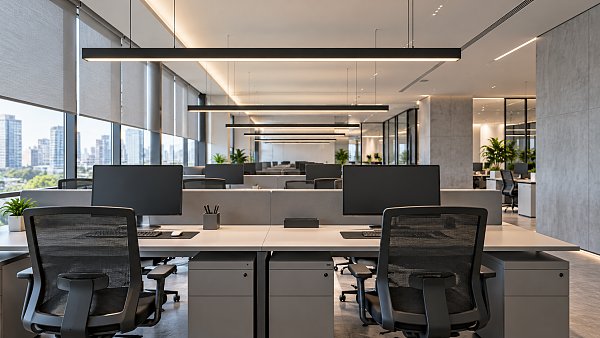
Glare can undermine an otherwise well-lit office, making screens harder to read and creating visual discomfort. Choosing commercial lighting for offices therefore requires more than comparing lumen output or fixture efficiency. Technical evaluators need to assess luminaire luminance, optical shielding, placement, and Unified Glare Rating (UGR) calculations under realistic room conditions—not rely on a standalone product claim.
The practical challenge is to maintain useful light on desks and surrounding surfaces without putting bright sources in employees’ sightlines. That requires decisions about the room, furniture, daylight, and controls as well as the luminaires. A credible proposal should explain how these elements work together and provide evidence that can be checked before installation.
Identify which glare problem you are solving
Direct glare comes from a bright source within the field of view: an exposed LED, a luminous panel, or a window. Reflected glare occurs when that source appears on a monitor, polished desktop, glass partition, or whiteboard. A fitting that feels comfortable when viewed from below may still produce an objectionable reflection on a tilted screen.
Discomfort glare describes visual annoyance; disability glare reduces visibility through scattered light within the eye. Office assessments commonly focus on discomfort glare, but visibility also depends on contrast, screen settings, daylight, and the user’s visual needs. Lowering every fixture’s output is not a reliable remedy: it can leave the desk underlit while the window remains excessively bright.
Before comparing products, document seated viewing directions, monitor positions, desk finishes, window exposure, and tasks. Include video meetings and shared workstations. A layout that works for employees facing one direction may perform poorly when desks rotate or meeting-room occupants look toward a wall-mounted display.
Treat “UGR below 19” as a calculation to verify
UGR evaluates discomfort glare from an installation using factors including source luminance, apparent source size, position relative to the observer, and background luminance. It is not an intrinsic fixture rating that remains unchanged in every room. Manufacturer UGR tables are useful screening tools, but their room proportions, reflectances, spacing, and observer assumptions matter.
EN 12464-1 is a relevant reference for indoor workplace lighting in markets using European standards. Its office task requirements commonly include a limiting UGR of 19 for activities such as writing, reading, and data processing. Confirm the applicable edition, task category, and project requirements rather than treating that value as a universal rule for every office space.
Ask the designer to calculate glare for representative seated positions and viewing directions, including uncomfortable-looking locations near perimeter desks or beneath fixture rows. Review maintained illuminance and uniformity alongside the glare result. A proposal should not obtain a favorable glare result simply by delivering insufficient task lighting.
UGR also has limits. It does not fully describe daylight glare, screen reflections, or every highly non-uniform LED emitting surface. A passing calculation supports a decision; it does not replace a visual assessment.
Compare optics, not just fixture categories
Two luminaires with similar lumens and watts can look very different from a seated position. Examine the visible emitting area, shielding geometry, and intensity distribution at high viewing angles. Small, bright apertures deserve particular scrutiny because concentrated light can be uncomfortable even when average desk illuminance is acceptable.
Microprismatic panels can control high-angle light while providing broad coverage. However, “microprismatic” describes an optical approach, not a guaranteed performance level. Request photometric evidence for the exact diffuser and output package offered; a visually similar substitute can change the result.
Recessed luminaires with deep baffles or louvers can shield bright sources from normal sightlines. The trade-off may be darker upper walls or a more directional distribution. Check spacing and room brightness rather than compensating automatically with higher output.
Direct-indirect pendants can illuminate the ceiling and reduce harsh brightness contrasts. Their suitability depends on suspension height, ceiling reflectance, and the direct-light component. A low pendant can remain conspicuous in seated sightlines, while an unsuitable ceiling may limit the benefit of uplight.
Do not rank these approaches by fixture efficacy alone. Compare installed power at equivalent maintained lighting conditions, including any additional fittings needed to achieve uniformity and comfortable wall or ceiling brightness.
Make the room layout part of the specification
A regular ceiling grid is convenient for construction, but it should not dictate every lighting position. Coordinate luminaire rows with monitor orientations and likely viewing directions. Check both direct visibility and reflected images in screens; there is no single placement rule that works for every screen angle and workstation arrangement.
Where possible, position screens so windows are to the side rather than directly behind the user or behind the display. Provide adjustable shading for changing sun conditions. Electric-light dimming can reduce unnecessary output near windows, but it cannot remove a bright window reflection.
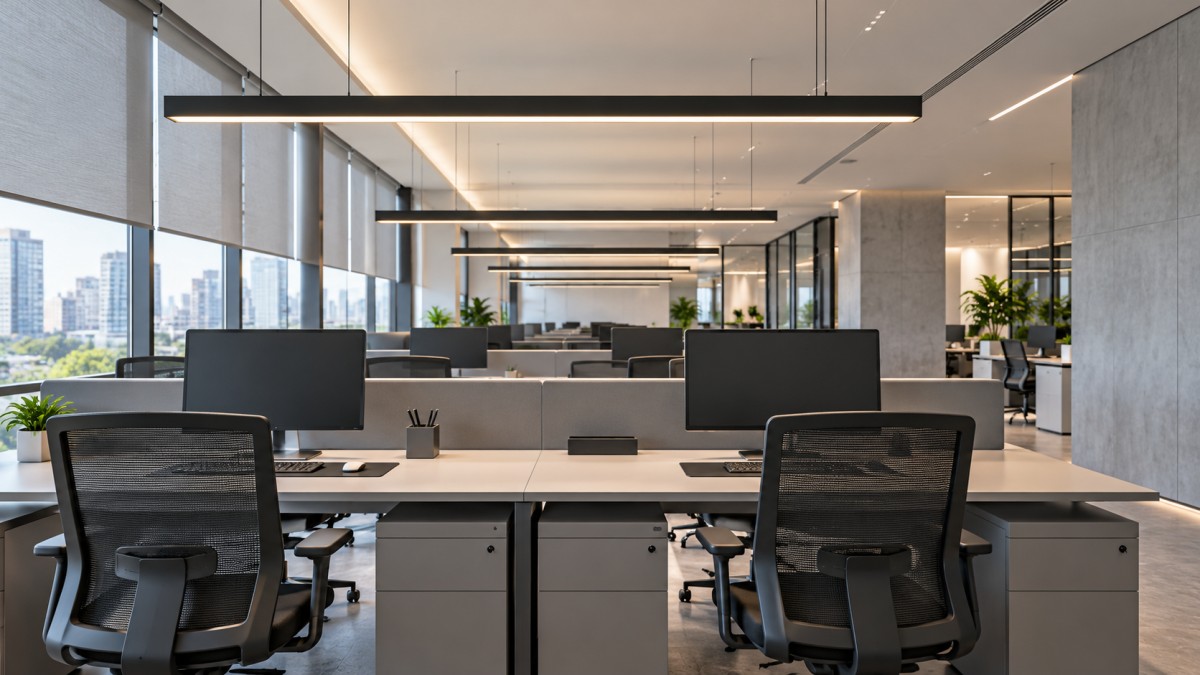
Surface finishes also change the outcome. Matte desktops generally produce less distinct reflected images than glossy ones. Light-colored ceilings and walls can support useful interreflection and a less contrast-heavy environment, but simulation reflectances should match the proposed finishes—not optimistic software defaults.
This is particularly important in offices with exposed dark ceilings. Replacing a light ceiling with dark services can alter perceived brightness and background luminance even if the calculated desk illuminance remains similar.
Request a comparable technical submission
Supplier comparisons become unreliable when each proposal uses different assumptions. Issue the same room geometry, furniture plan, maintenance assumptions, and performance criteria to every bidder. Ask for the following evidence:
- Exact luminaire configuration: optical assembly, output, dimensions, driver, and control option, with a matching IES or LDT photometric file.
- Calculation basis: mounting heights, reflectances, task areas, observer positions, maintenance factor, and relevant calculation limitations.
- Lighting results: maintained illuminance, uniformity, glare assessment, and relevant vertical illumination for faces, displays, or collaborative surfaces.
- Driver performance: dimming range, control compatibility, and available temporal light modulation test information, including behavior at reduced output.
- Delivery and maintenance details: component replacement arrangements, optical consistency, warranty terms, and procedures for approving substitutions.
Color temperature and color rendering belong in the specification, but neither is a glare rating. A warmer source can still be glaring. Likewise, visible flicker and stroboscopic effects are separate from glare and need their own assessment.
Keep compliance evidence separate from comfort evidence. UL certification or CE marking, where applicable, does not demonstrate low-glare performance. Check the requirements for the destination market and the documentation covering the actual supplied configuration.
Use controls to preserve comfort as conditions change
Daylight-responsive dimming, occupancy control, and task tuning can reduce unnecessary lighting, but zoning determines whether they work comfortably. A single control zone spanning window desks and deep-plan workstations often forces a compromise. Separate areas with materially different daylight exposure and provide a practical override where appropriate.
Specify commissioning behavior, not merely a control protocol. Define sensor placement, fade rates, minimum output, and how settings are restored after a power interruption. Abrupt changes or repeated dimming corrections can be distracting even when the luminaires themselves have good optics.
Task lights can support individual needs without raising ambient output across the whole floor. They still need shielding and sensible positioning; an exposed desk lamp reflected in a neighboring monitor simply moves the problem.
Approve a mock-up before approving the full order
For a substantial installation, test a representative bay using the proposed mounting height, optics, finishes, desks, and monitors. View it while seated, not only while walking beneath the fittings. Include different viewing directions and users with different visual needs.
Check screen reflections with typical content and darker backgrounds. Review full output and normal dimmed settings, with shading open and closed where practical. Record illuminance measurements and subjective observations separately: a lux meter cannot establish whether a visible source feels glaring. Photographs can document positions, but automatic exposure makes them unreliable as standalone proof of comfort.
Make approval conditional on the tested configuration. Changes to the diffuser, LED board, driver, or output should trigger a documented review, even if the housing and model family remain unchanged.
This evidence-led approach fits the role of Global Business & Consumer Ecosystem (G-BCE): connecting commercial-space specifications with technical benchmarking and supply-chain transparency. Evaluating lighting alongside furniture, controls, and sourcing requirements helps prevent individually acceptable components from creating an uncomfortable workplace.
Before selecting commercial lighting for offices, require three things to agree: the project calculation, the representative mock-up, and the configuration committed to in the supply documents. If one is missing, the glare performance remains an assumption rather than a verified basis for purchase.
News Recommendations
 How to choose commercial lighting for offices that reduces glare
![51a6ab95581761cc26f4318be6520c15]()
Aris Katos
Future of Carbide Coatings
 Queue Launches Fully Automated Robotic Pharmacy Kiosk for 30-Second Dispensing
![51a6ab95581761cc26f4318be6520c15]()
Aris Katos
Future of Carbide Coatings
 Can your supermarket store fixtures supplier meet your opening date?
![51a6ab95581761cc26f4318be6520c15]()
Aris Katos
Future of Carbide Coatings
 Shopify POS UI Extensions 2026-10 Adds Virtual Lists and Custom Row Templates
![51a6ab95581761cc26f4318be6520c15]()
Aris Katos
Future of Carbide Coatings
 How to assess smart office furniture suppliers’ North American support
![51a6ab95581761cc26f4318be6520c15]()
Aris Katos
Future of Carbide Coatings
 Aqara Launches Smart Lighting Range to Advance AI Spatial Intelligence
![51a6ab95581761cc26f4318be6520c15]()
Aris Katos
Future of Carbide Coatings
 How to assess demand forecasts in a lighting intelligence report
![51a6ab95581761cc26f4318be6520c15]()
Aris Katos
Future of Carbide Coatings
 Billerud推出PharmaKraft纤维基医药包装材料
![51a6ab95581761cc26f4318be6520c15]()
Aris Katos
Future of Carbide Coatings
 How to assess supplier reliability in global supply chain sourcing
![51a6ab95581761cc26f4318be6520c15]()
Aris Katos
Future of Carbide Coatings
 Omdia Forecasts 11.6% CAGR for Global LED Video Display Market in 2026–2030
![51a6ab95581761cc26f4318be6520c15]()
Aris Katos
Future of Carbide Coatings
 How to verify an LFGB testing laboratory's accreditation scope
![51a6ab95581761cc26f4318be6520c15]()
Aris Katos
Future of Carbide Coatings
 How to assess a workplace interior supplier's installation scope
![51a6ab95581761cc26f4318be6520c15]()
Aris Katos
Future of Carbide Coatings
 What records are needed for an ISO 9001 furniture factory audit?
![51a6ab95581761cc26f4318be6520c15]()
Aris Katos
Future of Carbide Coatings
 How to choose AI marketing tools that work with your existing CRM
![51a6ab95581761cc26f4318be6520c15]()
Aris Katos
Future of Carbide Coatings
 Do freight costs erase savings when buying retail fixtures wholesale?
![51a6ab95581761cc26f4318be6520c15]()
Aris Katos
Future of Carbide Coatings
 Who handles firmware updates for an OEM retail shelf screen?
![51a6ab95581761cc26f4318be6520c15]()
Aris Katos
Future of Carbide Coatings
 How to assess burn-in testing at an OEM retail shelf screen factory
![51a6ab95581761cc26f4318be6520c15]()
Aris Katos
Future of Carbide Coatings
 How custom tooling affects the cost of an OEM shelf LCD screen
![51a6ab95581761cc26f4318be6520c15]()
Aris Katos
Future of Carbide Coatings
 Can OEM retail shelf display screens work with your existing CMS?
![51a6ab95581761cc26f4318be6520c15]()
Aris Katos
Future of Carbide Coatings
 How heat buildup affects OEM retail shelf LCD screen reliability
![51a6ab95581761cc26f4318be6520c15]()
Aris Katos
Future of Carbide Coatings
 How to check whether an OEM retail shelf screen fits existing shelving
![51a6ab95581761cc26f4318be6520c15]()
Aris Katos
Future of Carbide Coatings
 What brightness should an OEM shelf LCD screen have for retail use?
![51a6ab95581761cc26f4318be6520c15]()
Aris Katos
Future of Carbide Coatings
 Can smart retail IT solutions for CPG work with legacy POS systems?
![51a6ab95581761cc26f4318be6520c15]()
Aris Katos
Future of Carbide Coatings
 What permit approvals belong in a commercial fitout planning checklist?
![51a6ab95581761cc26f4318be6520c15]()
Aris Katos
Future of Carbide Coatings
 How Can You Ensure Commercial Furniture Meets Local Safety Regulations?
![51a6ab95581761cc26f4318be6520c15]()
Aris Katos
Future of Carbide Coatings
 What Are the Most Common Mistakes When Sourcing Wholesale Office Furniture?
![51a6ab95581761cc26f4318be6520c15]()
Aris Katos
Future of Carbide Coatings
 Can You Trust G-BCE Supplier Ratings Without Independent Verification?
![51a6ab95581761cc26f4318be6520c15]()
Aris Katos
Future of Carbide Coatings
 What Selection Criteria Matter Most for Commercial Lighting?
![51a6ab95581761cc26f4318be6520c15]()
Aris Katos
Future of Carbide Coatings
 How Do You Apply Sustainability Standards to a Retail Renovation?
![51a6ab95581761cc26f4318be6520c15]()
Aris Katos
Future of Carbide Coatings
 Which Technical Factors Matter When Comparing Smart Retail Hardware?
![51a6ab95581761cc26f4318be6520c15]()
Aris Katos
Future of Carbide Coatings
 Does Data Transparency Matter When Selecting Consumer Goods Suppliers?
![51a6ab95581761cc26f4318be6520c15]()
Aris Katos
Future of Carbide Coatings
 How Does Commercial Design Differ from Interior Decoration?
![51a6ab95581761cc26f4318be6520c15]()
Aris Katos
Future of Carbide Coatings
 How Long Does It Take to Verify a Commercial Furniture Supplier?
![51a6ab95581761cc26f4318be6520c15]()
Aris Katos
Future of Carbide Coatings
 How to verify compostability claims from a bubble mailer manufacturer
![51a6ab95581761cc26f4318be6520c15]()
Aris Katos
Future of Carbide Coatings
 Will commercial smart infrastructure solutions work with legacy systems?
![51a6ab95581761cc26f4318be6520c15]()
Aris Katos
Future of Carbide Coatings
 How to verify a preschool furniture manufacturer's safety standards
![51a6ab95581761cc26f4318be6520c15]()
Aris Katos
Future of Carbide Coatings
 A technical comparison of semiconductor processes for power devices
![51a6ab95581761cc26f4318be6520c15]()
Aris Katos
Future of Carbide Coatings
 How to verify that a BIFMA ergonomic chair meets the standard
![51a6ab95581761cc26f4318be6520c15]()
Aris Katos
Future of Carbide Coatings
 How to use a CRI value chart when choosing LED lighting
![51a6ab95581761cc26f4318be6520c15]()
Aris Katos
Future of Carbide Coatings