Ergonomic Office Design Mistakes to Avoid
Time
Click Count
Even well-intentioned workspaces can fail when ergonomic office design is treated as an afterthought.
A desk that looks refined may still create strain, distraction, and inefficient movement.
Across commercial environments, small layout errors often become measurable operational problems over time.
This article explains the most common ergonomic office design mistakes to avoid.
It also connects workplace comfort with broader standards for safety, flexibility, durability, and commercial performance.
Foundational View of Ergonomic Office Design
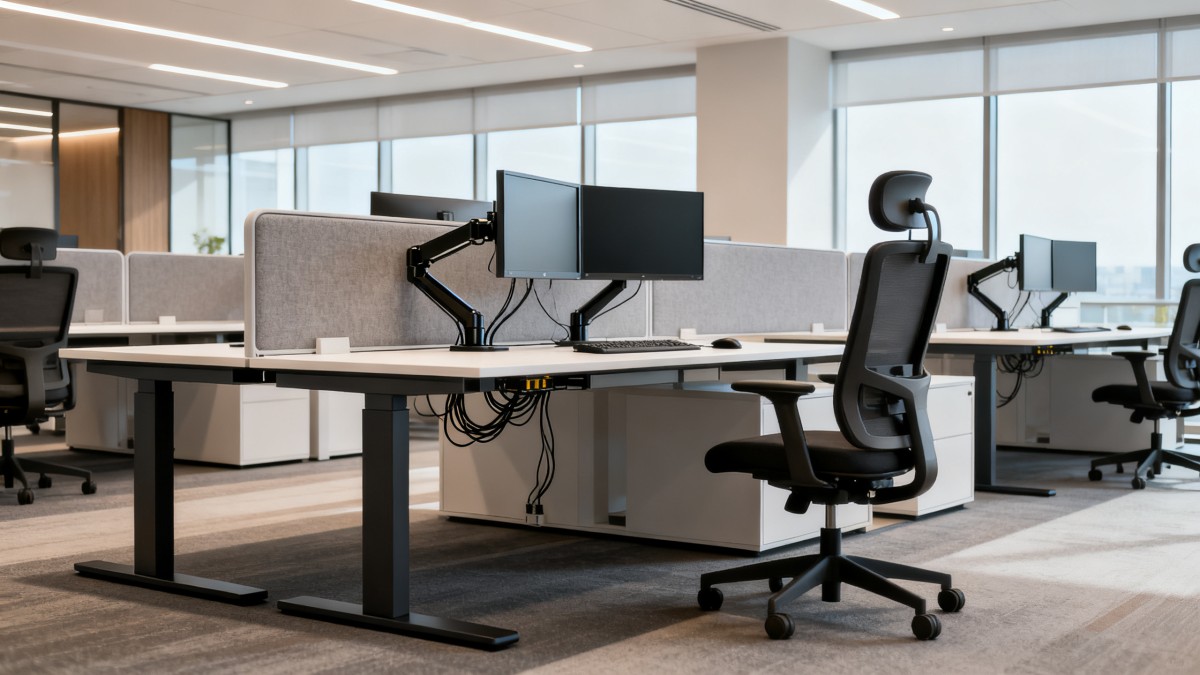
Ergonomic office design aligns furniture, lighting, circulation, and technology with human posture and task requirements.
It is not limited to chairs or monitor arms.
It includes reach zones, acoustic balance, screen height, leg clearance, and adaptable workstation planning.
Good ergonomic office design reduces physical stress while supporting focus, safety, and long-term space efficiency.
Poor decisions usually appear subtle at first.
However, repetitive discomfort can lead to absenteeism, lower engagement, and unnecessary retrofit costs.
In modern commercial settings, ergonomics also intersects with compliance and technical benchmarking.
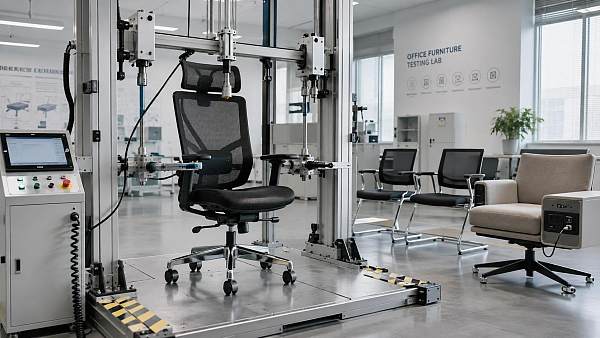
Standards such as BIFMA, UL, and CE help frame expectations for performance, safety, and durability.
Current Industry Signals Shaping Workspace Decisions
Commercial office planning now sits at the intersection of design, employee wellbeing, and digital infrastructure.
Hybrid work has increased demand for spaces that support multiple postures and fast reconfiguration.
At the same time, sustainability goals are pushing buyers toward durable, low-emission materials.
The following signals explain why ergonomic office design receives renewed attention across sectors.
- More screen-based tasks increase neck, wrist, and eye strain risks.
- Flexible schedules require shared workstations with quick adjustment features.
- Smart offices need cable management, power access, and device integration.
- Global fit-out strategies now compare products against international ergonomic standards.
- Commercial tenants expect healthier environments as part of workplace value.
Common Ergonomic Office Design Mistakes to Avoid
Ignoring adjustability
One fixed desk height rarely fits every user or every task.
Without adjustability, shoulders rise, wrists bend, and seated posture deteriorates quickly.
Ergonomic office design should prioritize chairs, desks, and monitor supports with practical adjustment ranges.
Choosing furniture by appearance alone
Minimalist furniture may photograph well but fail under daily commercial use.
Seat depth, lumbar support, edge radius, and stability matter more than visual uniformity alone.
High-traffic spaces require ergonomic office design that balances brand image with measurable comfort.
Poor monitor placement
Screens placed too low or too far away create neck extension and eye fatigue.
Dual-monitor setups often fail when one screen becomes the true primary display.
Monitor positioning should reflect actual workflow, not generic installation habits.
Underestimating lighting quality
Lighting errors are among the most overlooked ergonomic office design issues.
Glare on screens, harsh contrast, and low task illumination reduce concentration and increase visual strain.
Layered lighting works better than relying on overhead fixtures alone.
Neglecting circulation and movement
A comfortable chair cannot solve a static environment.
Workplaces need enough clearance for standing, turning, and natural transitions between tasks.
Tight pathways and crowded layouts reduce both safety and ease of use.
Forgetting acoustics
Ergonomic office design also concerns cognitive comfort.
Noise from calls, equipment, and circulation can force awkward posture as users compensate to focus.
Acoustic panels, zoning, and quiet rooms often improve usability more than another furniture upgrade.
Treating power and cables as a late-stage issue
Visible cables create tripping hazards and awkward device placement.
When charging points are too far away, desks become cluttered with improvised solutions.
Smart ergonomic office design plans power, data, and device mounting from the start.
Business Value of Better Ergonomic Office Design
Avoiding these mistakes delivers more than physical comfort.
It supports a stronger commercial environment with lower friction and better daily performance.
For integrated business ecosystems, ergonomic office design improves both user experience and asset efficiency.
- Reduced strain-related complaints and fewer workspace adjustments after occupancy.
- Longer furniture service life through better product specification.
- Improved support for digital tools, collaborative work, and focused tasks.
- More credible alignment with international quality benchmarks.
- Stronger brand perception in client-facing commercial interiors.
In many cases, the cost of redesign comes not from premium products, but from poor early decisions.
That makes ergonomic office design a strategic planning issue, not a decorative upgrade.
Typical Commercial Scenarios and Risk Points
Different environments show different ergonomic office design risks.
Recognizing the setting helps prevent generic solutions that do not fit actual usage.
Practical Guidance for Better Planning
Effective ergonomic office design begins before furniture orders are placed.
The most reliable process combines space analysis, task mapping, and technical review.
- Map tasks by duration, device type, and collaboration intensity.
- Specify adjustment ranges instead of generic furniture categories.
- Review lighting with screen positions, daylight angles, and control options.
- Reserve enough clearance for movement, storage access, and cleaning.
- Check products against relevant standards, including BIFMA, UL, and CE where applicable.
- Plan cable routing and power access as part of workstation ergonomics.
- Evaluate layouts after occupancy and adjust based on actual user behavior.
This approach reduces guesswork and supports more resilient commercial interiors.
It also helps compare suppliers and systems on performance, not just appearance or initial cost.
Operational Next Steps
The best next move is a structured review of existing workspace conditions.
Look at posture risks, lighting conflicts, circulation bottlenecks, and workstation variability.
Then prioritize corrections with the highest impact on daily comfort and long-term efficiency.
When ergonomic office design is benchmarked carefully, commercial spaces become healthier, smarter, and easier to operate.
That is why avoiding common ergonomic office design mistakes should be part of every serious workplace modernization plan.
News Recommendations
 How to compare hotel aroma diffuser wholesale options by coverage area
![51a6ab95581761cc26f4318be6520c15]()
Aris Katos
Future of Carbide Coatings
 How to prevent O-rings and seals from failing in food equipment
![51a6ab95581761cc26f4318be6520c15]()
Aris Katos
Future of Carbide Coatings
 How to compare commercial linear light wholesale quotes accurately
![51a6ab95581761cc26f4318be6520c15]()
Aris Katos
Future of Carbide Coatings
 How to verify international standards compliance for Middle East exports
![51a6ab95581761cc26f4318be6520c15]()
Aris Katos
Future of Carbide Coatings
 How to select laboratory instruments for reproducible test results
![51a6ab95581761cc26f4318be6520c15]()
Aris Katos
Future of Carbide Coatings
 When does a sheet metal prototype reveal design flaws early?
![51a6ab95581761cc26f4318be6520c15]()
Aris Katos
Future of Carbide Coatings
 When PE air column bags reduce damage in e-commerce fulfillment
![51a6ab95581761cc26f4318be6520c15]()
Aris Katos
Future of Carbide Coatings
 How energy-efficient design reduces operating costs in retail lighting
![51a6ab95581761cc26f4318be6520c15]()
Aris Katos
Future of Carbide Coatings
 When commercial aluminum storefronts make sense for a retail renovation
![51a6ab95581761cc26f4318be6520c15]()
Aris Katos
Future of Carbide Coatings
 What makes LED lights durable in high-use commercial spaces?
![51a6ab95581761cc26f4318be6520c15]()
Aris Katos
Future of Carbide Coatings
 Which industry categories offer the strongest export potential in Latin America?
![51a6ab95581761cc26f4318be6520c15]()
Aris Katos
Future of Carbide Coatings
 How to choose an ultra bright waterproof window display for storefronts
![51a6ab95581761cc26f4318be6520c15]()
Aris Katos
Future of Carbide Coatings
 How to verify suppliers on a trade portal for global sourcing
![51a6ab95581761cc26f4318be6520c15]()
Aris Katos
Future of Carbide Coatings
 How RoHS requirements should be stated in product specifications
![51a6ab95581761cc26f4318be6520c15]()
Aris Katos
Future of Carbide Coatings
 What affects the lead time for custom retail counter displays?
![51a6ab95581761cc26f4318be6520c15]()
Aris Katos
Future of Carbide Coatings
 What consumer packaging USA importers need to verify before ordering
![51a6ab95581761cc26f4318be6520c15]()
Aris Katos
Future of Carbide Coatings
 How commercial spaces interiors shape customer dwell time
![51a6ab95581761cc26f4318be6520c15]()
Aris Katos
Future of Carbide Coatings
 How LED commercial lighting design reduces glare in retail spaces
![51a6ab95581761cc26f4318be6520c15]()
Aris Katos
Future of Carbide Coatings
 How industrial technology information improves RFID inventory accuracy
![51a6ab95581761cc26f4318be6520c15]()
Aris Katos
Future of Carbide Coatings
 When drip garden watering systems make more sense than sprinklers
![51a6ab95581761cc26f4318be6520c15]()
Aris Katos
Future of Carbide Coatings
 When category comparison improves sourcing for industrial applications
![51a6ab95581761cc26f4318be6520c15]()
Aris Katos
Future of Carbide Coatings
 Industrial application guidance for selecting the right LED lighting
![51a6ab95581761cc26f4318be6520c15]()
Aris Katos
Future of Carbide Coatings
 Which commercial architecture standards apply to European retail fit-outs?
![51a6ab95581761cc26f4318be6520c15]()
Aris Katos
Future of Carbide Coatings
 How to verify FDA requirements for maternity care products
![51a6ab95581761cc26f4318be6520c15]()
Aris Katos
Future of Carbide Coatings
 How to verify BPA-free claims for food-contact products
![51a6ab95581761cc26f4318be6520c15]()
Aris Katos
Future of Carbide Coatings
 When does a European wholesale supplier suit modular office projects?
![51a6ab95581761cc26f4318be6520c15]()
Aris Katos
Future of Carbide Coatings
 When consumer ecosystem solutions improve the in-store shopping journey
![51a6ab95581761cc26f4318be6520c15]()
Aris Katos
Future of Carbide Coatings
 How a commercial developers network can reduce site selection risk
![51a6ab95581761cc26f4318be6520c15]()
Aris Katos
Future of Carbide Coatings
 How clear purchasing specifications prevent costly supplier deviations
![51a6ab95581761cc26f4318be6520c15]()
Aris Katos
Future of Carbide Coatings
 What an ISTA drop test lab checks before your packaging ships
![51a6ab95581761cc26f4318be6520c15]()
Aris Katos
Future of Carbide Coatings
 Which commercial furniture standards apply to workplace seating?
![51a6ab95581761cc26f4318be6520c15]()
Aris Katos
Future of Carbide Coatings
 How to evaluate smart lighting module OEM compatibility before sampling
![51a6ab95581761cc26f4318be6520c15]()
Aris Katos
Future of Carbide Coatings
 How to assess whether sustainable technology delivers real impact
![51a6ab95581761cc26f4318be6520c15]()
Aris Katos
Future of Carbide Coatings
 How to assess an OEM supplier’s quality control before ordering
![51a6ab95581761cc26f4318be6520c15]()
Aris Katos
Future of Carbide Coatings
 How consumer ecosystem solutions data can improve retail personalization
![51a6ab95581761cc26f4318be6520c15]()
Aris Katos
Future of Carbide Coatings
 When does consumer packaging design justify a higher product price?
![51a6ab95581761cc26f4318be6520c15]()
Aris Katos
Future of Carbide Coatings
 Supermarket Fixture Installation: Planning Layouts, Wiring, and Handover
![51a6ab95581761cc26f4318be6520c15]()
Aris Katos
Future of Carbide Coatings
 Automated Lighting and Smart Lighting Control in Bergerac: Key Project Considerations
![51a6ab95581761cc26f4318be6520c15]()
Aris Katos
Future of Carbide Coatings
 Segment Streetlight Controllers: Choosing Control Modes for Urban Roads
![51a6ab95581761cc26f4318be6520c15]()
Aris Katos
Future of Carbide Coatings