How to evaluate a barcode scanner manufacturer for kiosk projects
Time
Click Count
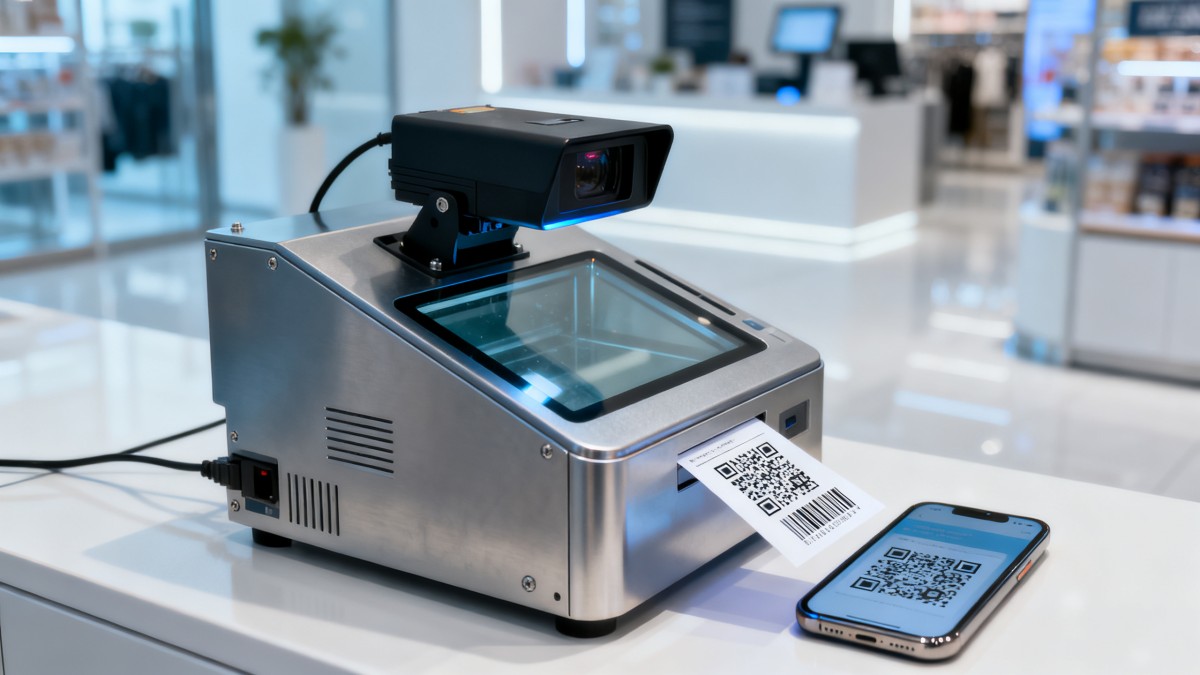
A kiosk project rarely fails because someone forgot to compare scan speed on a datasheet. More often, the trouble starts later: a scanner window fogs under harsh lighting, decoding drops when users present worn mobile screens, firmware updates become slow and fragmented, or a supplier cannot keep a production revision stable across rollout phases. That is why evaluating a barcode scanner manufacturer for kiosk projects requires a wider lens than simple unit pricing.
For project managers and engineering leads, the real question is not just “Can this scanner read codes?” but “Can this manufacturer support a kiosk program from prototype to global deployment without creating downstream risk?” In self-service retail, ticketing, healthcare check-in, parcel lockers, hospitality, and access control, the scanner becomes part of a larger interaction system. It must work with industrial design constraints, software stacks, regional compliance rules, maintenance expectations, and procurement timelines.
This guide looks at how to assess a manufacturer with that project reality in mind.
Start with the kiosk use case, not the scanner module
One of the most common sourcing mistakes is reviewing scanner vendors before the team has defined the actual scanning environment. A barcode scanner that performs well on a bench test may behave very differently once placed behind protective glass, under a curved bezel, or in a brightly lit entrance area.
Before comparing suppliers, clarify a few project-specific conditions:
- Will users scan 1D barcodes, 2D QR codes, or both?
- Are the codes printed on paper, displayed on smartphones, or presented on damaged labels?
- Is the kiosk indoor, semi-outdoor, refrigerated, or exposed to dust?
- Does the scan need to happen quickly at arm’s length, or precisely at a narrow read zone?
- Will the kiosk be operated by consumers, staff, or mixed audiences?
- What happens if the scanner fails: inconvenience, queue buildup, or revenue interruption?
A strong manufacturer will not jump straight into quoting. They will ask about optical path, housing material, mounting angle, ambient light, user workflow, and host system integration. That behavior is often an early sign of engineering maturity.
Compatibility is broader than interface support
Many vendors will say their scanner supports USB, UART, RS232, or other common interfaces. That matters, but it is only the first layer. In kiosk projects, compatibility also includes how easily the module fits into the overall architecture.
Look for evidence in four areas:
Mechanical integration
Ask for dimensional drawings, keep-out zones, mounting recommendations, and tolerance guidance. If your kiosk has a thin front panel or a heavily branded industrial design, scanner geometry becomes critical. Small differences in window placement or aiming field can affect usability more than raw decode speed.
Optical performance behind real materials
If the scanner will sit behind a cover lens, check whether the manufacturer has validated performance through glass, acrylic, or coated protective windows. Reflection, haze, tint, and adhesive quality can all reduce read rates. The best suppliers will recommend material specs or test with your actual front-panel sample.
Software and driver stability
For engineering teams, driver support and SDK documentation can save weeks. You want to know whether the manufacturer offers mature libraries, configuration tools, firmware update utilities, and host-side debugging support. A scanner module that is technically capable but poorly documented can become a hidden integration cost.
Protocol flexibility
Kiosk workflows often need more than “read and output data.” You may need trigger control, illumination control, sleep modes, read-success indicators, health monitoring, or remote configuration. Ask whether these are supported at the command level and how well they are documented.
Decode performance should be tested in inconvenient conditions
Every scanner looks good when reading clean sample codes in ideal lighting. Real users are less cooperative. They tilt phones, crack screens, lower brightness, and hold labels at awkward angles. Packaging gets wrinkled. Tickets fade. If your kiosk is customer-facing, the scanner manufacturer should be able to discuss these realities without being prompted.
When evaluating a barcode scanner manufacturer, ask how they validate performance across:
- Low screen brightness and OLED/LED phone displays
- Scratched or smudged protective windows
- High ambient light or direct sunlight spill
- Curved, reflective, or low-contrast packaging
- Dirty, torn, or partially damaged labels
- Fast presentation by inexperienced users
It is wise to prepare a test kit using your own barcodes, ticket formats, mobile wallet passes, and worst-case labels. A capable manufacturer should be comfortable with customer-specific validation rather than relying only on catalog claims.
Reliability is not just IP rating and drop resistance
For kiosks, reliability has a slightly different meaning than for handheld scanners. The scanner may not be dropped by an operator, but it will live in a fixed enclosure for years with heat buildup, power cycling, dust ingress, vibration during transport, and varying customer usage intensity.
So ask questions that go beyond headline ruggedness:
- What is the expected service life of the illumination and imaging components?
- How does the unit handle thermal buildup in enclosed kiosk spaces?
- Are there known failure modes related to protective windows, cable strain, or board-level connectors?
- Has the manufacturer performed long-duration continuous operation testing?
- What design revisions have been made based on field feedback?
A trustworthy manufacturer will not pretend failure never happens. Instead, they can explain how they reduce it, detect it, and support recovery. That is a far better sign than polished marketing language.
Certification and compliance need early verification
In kiosk programs, scanner selection can delay market entry if compliance is checked too late. Depending on your target regions and application, you may need evidence related to CE, FCC, UL-related system considerations, RoHS, REACH, laser or LED safety, and industry-specific requirements.
The scanner manufacturer does not need to solve every final system certification issue alone, but they should provide a clear compliance package and communicate where their responsibility ends and the kiosk integrator’s responsibility begins.
This is especially important for global rollouts. A module acceptable in one market may need additional documentation, labeling adjustments, or firmware controls elsewhere. For sourcing teams working across multiple jurisdictions, organizations such as G-BCE often emphasize this kind of benchmarking because technical suitability without documentation discipline is still a project risk.
Manufacturing control matters more than sample quality
It is easy to be impressed by a polished sample. The harder question is whether the supplier can maintain consistency through pilot, ramp-up, and replenishment phases. Kiosk deployments often happen in waves, sometimes across countries and over long timelines. If the scanner module changes quietly between batches, your software image, mechanical fit, or field behavior can drift.
When reviewing a barcode scanner manufacturer, discuss:
- Revision control for hardware, firmware, and key components
- Change notification procedures
- Traceability at batch or serial level
- Production testing methods
- Supplier dependency for critical subcomponents
- Lead time stability and buffer planning
Ask directly how they handled recent component shortages or lifecycle transitions. Their answer will reveal whether they operate with disciplined supply chain management or simply react when problems arrive.
Support quality shows up in the pre-sales process
Project leaders often sense a future support problem before a purchase order is ever issued. Slow answers, vague technical replies, recycled PDF attachments, and reluctance to involve engineers are all warning signs. In kiosk integration, support quality is not a soft factor. It directly affects deployment speed and post-installation service costs.
A manufacturer worth shortlisting should be able to provide:
- Responsive technical contacts during evaluation
- Reference designs or application notes for embedded use
- Debugging assistance during bring-up
- Firmware customization guidance, if applicable
- Clear RMA and failure analysis procedures
- Lifecycle communication for long-term programs
If your kiosk project includes international rollout, also consider time-zone coverage and English-language technical clarity. Many preventable delays come from small misunderstandings in protocol behavior, trigger logic, or enclosure constraints.
Do not underestimate the user experience layer
Engineers may focus on decode rate, but end users remember whether the kiosk feels effortless. A scanner that works technically yet forces repeated repositioning can damage throughput and customer confidence. In consumer-facing environments, friction compounds quickly: longer queues, more staff intervention, more abandoned transactions.
That is why a manufacturer should be evaluated partly on how well they understand human factors. Can they recommend read window size, illumination behavior, feedback cues, and scan zone design for public use? Do they understand the difference between a parcel drop-off kiosk and a luxury retail self-checkout where aesthetics and interaction smoothness carry equal weight?
This is where cross-sector benchmarking becomes valuable. In modern commercial environments, the scanner is not an isolated component. It sits within a larger ecosystem of smart retail technology, branded fixture design, digital workflows, and operational resilience. The best manufacturing partners understand that balance.
A practical shortlist framework for project teams
When the options start to blur together, use a weighted review instead of relying on instinct. A simple decision framework can help procurement, engineering, and operations stay aligned.
Score each manufacturer against the following categories:
- Technical fit: symbology support, read performance, interface options, power requirements
- Integration readiness: drawings, SDKs, command documentation, sample support
- Kiosk suitability: enclosed operation, front-window performance, user presentation tolerance
- Compliance readiness: certification documents, regional support, material declarations
- Manufacturing stability: revision control, traceability, production capacity, lifecycle planning
- Support responsiveness: speed, accuracy, engineering access, issue resolution process
- Total project risk: not just piece price, but cost of delay, failure, and rework
This kind of matrix helps prevent a familiar mistake: choosing the cheapest module and then absorbing the hidden costs in testing, redesign, field service, and schedule slippage.
Questions worth asking before final approval
Before you lock a supplier, ask a few questions that often separate mature manufacturers from opportunistic vendors:
- What kiosk applications has this module been designed or adapted for?
- Can you share integration constraints that usually cause scan issues?
- How do you manage firmware changes after mass production begins?
- What components in this module have the highest lifecycle risk?
- What is your process when a customer reports intermittent field failures?
- Can you support validation using our actual enclosure materials and barcode set?
The value of these questions is not only in the answers, but in how the manufacturer answers them. Precision, transparency, and willingness to discuss limitations usually indicate a partner who understands project accountability.
Choosing the right manufacturer is really about reducing uncertainty
For kiosk projects, scanner selection sits at the intersection of hardware engineering, user interaction, compliance, and supply chain execution. That is why evaluating a barcode scanner manufacturer should feel less like buying a commodity and more like qualifying a long-term subsystem partner.
The right choice is rarely the one with the most dramatic specification sheet. It is the manufacturer that can prove fit in your environment, communicate clearly across teams, hold production consistency over time, and support the small technical details that determine whether a kiosk feels reliable in the real world.
For project managers and engineering leads, that discipline pays off twice: once during deployment, and again months later when the kiosks are still scanning smoothly and nobody is opening service tickets for a preventable sourcing decision.
News Recommendations
 How to select laboratory instruments for reproducible test results
![51a6ab95581761cc26f4318be6520c15]()
Aris Katos
Future of Carbide Coatings
 When does a sheet metal prototype reveal design flaws early?
![51a6ab95581761cc26f4318be6520c15]()
Aris Katos
Future of Carbide Coatings
 When PE air column bags reduce damage in e-commerce fulfillment
![51a6ab95581761cc26f4318be6520c15]()
Aris Katos
Future of Carbide Coatings
 How energy-efficient design reduces operating costs in retail lighting
![51a6ab95581761cc26f4318be6520c15]()
Aris Katos
Future of Carbide Coatings
 When commercial aluminum storefronts make sense for a retail renovation
![51a6ab95581761cc26f4318be6520c15]()
Aris Katos
Future of Carbide Coatings
 What makes LED lights durable in high-use commercial spaces?
![51a6ab95581761cc26f4318be6520c15]()
Aris Katos
Future of Carbide Coatings
 Which industry categories offer the strongest export potential in Latin America?
![51a6ab95581761cc26f4318be6520c15]()
Aris Katos
Future of Carbide Coatings
 How to choose an ultra bright waterproof window display for storefronts
![51a6ab95581761cc26f4318be6520c15]()
Aris Katos
Future of Carbide Coatings
 How to verify suppliers on a trade portal for global sourcing
![51a6ab95581761cc26f4318be6520c15]()
Aris Katos
Future of Carbide Coatings
 How RoHS requirements should be stated in product specifications
![51a6ab95581761cc26f4318be6520c15]()
Aris Katos
Future of Carbide Coatings
 What affects the lead time for custom retail counter displays?
![51a6ab95581761cc26f4318be6520c15]()
Aris Katos
Future of Carbide Coatings
 What consumer packaging USA importers need to verify before ordering
![51a6ab95581761cc26f4318be6520c15]()
Aris Katos
Future of Carbide Coatings
 How commercial spaces interiors shape customer dwell time
![51a6ab95581761cc26f4318be6520c15]()
Aris Katos
Future of Carbide Coatings
 How LED commercial lighting design reduces glare in retail spaces
![51a6ab95581761cc26f4318be6520c15]()
Aris Katos
Future of Carbide Coatings
 How industrial technology information improves RFID inventory accuracy
![51a6ab95581761cc26f4318be6520c15]()
Aris Katos
Future of Carbide Coatings
 When drip garden watering systems make more sense than sprinklers
![51a6ab95581761cc26f4318be6520c15]()
Aris Katos
Future of Carbide Coatings
 When category comparison improves sourcing for industrial applications
![51a6ab95581761cc26f4318be6520c15]()
Aris Katos
Future of Carbide Coatings
 Industrial application guidance for selecting the right LED lighting
![51a6ab95581761cc26f4318be6520c15]()
Aris Katos
Future of Carbide Coatings
 Which commercial architecture standards apply to European retail fit-outs?
![51a6ab95581761cc26f4318be6520c15]()
Aris Katos
Future of Carbide Coatings
 How to verify FDA requirements for maternity care products
![51a6ab95581761cc26f4318be6520c15]()
Aris Katos
Future of Carbide Coatings
 How to verify BPA-free claims for food-contact products
![51a6ab95581761cc26f4318be6520c15]()
Aris Katos
Future of Carbide Coatings
 When does a European wholesale supplier suit modular office projects?
![51a6ab95581761cc26f4318be6520c15]()
Aris Katos
Future of Carbide Coatings
 When consumer ecosystem solutions improve the in-store shopping journey
![51a6ab95581761cc26f4318be6520c15]()
Aris Katos
Future of Carbide Coatings
 How a commercial developers network can reduce site selection risk
![51a6ab95581761cc26f4318be6520c15]()
Aris Katos
Future of Carbide Coatings
 How clear purchasing specifications prevent costly supplier deviations
![51a6ab95581761cc26f4318be6520c15]()
Aris Katos
Future of Carbide Coatings
 What an ISTA drop test lab checks before your packaging ships
![51a6ab95581761cc26f4318be6520c15]()
Aris Katos
Future of Carbide Coatings
 Which commercial furniture standards apply to workplace seating?
![51a6ab95581761cc26f4318be6520c15]()
Aris Katos
Future of Carbide Coatings
 How to evaluate smart lighting module OEM compatibility before sampling
![51a6ab95581761cc26f4318be6520c15]()
Aris Katos
Future of Carbide Coatings
 How to assess whether sustainable technology delivers real impact
![51a6ab95581761cc26f4318be6520c15]()
Aris Katos
Future of Carbide Coatings
 How to assess an OEM supplier’s quality control before ordering
![51a6ab95581761cc26f4318be6520c15]()
Aris Katos
Future of Carbide Coatings
 How consumer ecosystem solutions data can improve retail personalization
![51a6ab95581761cc26f4318be6520c15]()
Aris Katos
Future of Carbide Coatings
 When does consumer packaging design justify a higher product price?
![51a6ab95581761cc26f4318be6520c15]()
Aris Katos
Future of Carbide Coatings
 Supermarket Fixture Installation: Planning Layouts, Wiring, and Handover
![51a6ab95581761cc26f4318be6520c15]()
Aris Katos
Future of Carbide Coatings
 Automated Lighting and Smart Lighting Control in Bergerac: Key Project Considerations
![51a6ab95581761cc26f4318be6520c15]()
Aris Katos
Future of Carbide Coatings
 Segment Streetlight Controllers: Choosing Control Modes for Urban Roads
![51a6ab95581761cc26f4318be6520c15]()
Aris Katos
Future of Carbide Coatings
 IEC 62471-2 Explained: How to Assess Photobiological Risks in LED Lighting
![51a6ab95581761cc26f4318be6520c15]()
Aris Katos
Future of Carbide Coatings
 Food Grade Packaging Requirements by Product Type, Temperature, and Contact Risk
![51a6ab95581761cc26f4318be6520c15]()
Aris Katos
Future of Carbide Coatings
 Food Packaging Compliance Checklist: Tests, Records, and Labeling Before Shipment
![51a6ab95581761cc26f4318be6520c15]()
Aris Katos
Future of Carbide Coatings
 NSF Food Packaging Standards: When Certification Matters for Commercial Food Use
![51a6ab95581761cc26f4318be6520c15]()
Aris Katos
Future of Carbide Coatings