Posture Support Office Furniture: What Actually Improves Comfort
Time
Click Count
Why does posture support office furniture matter more than it used to?
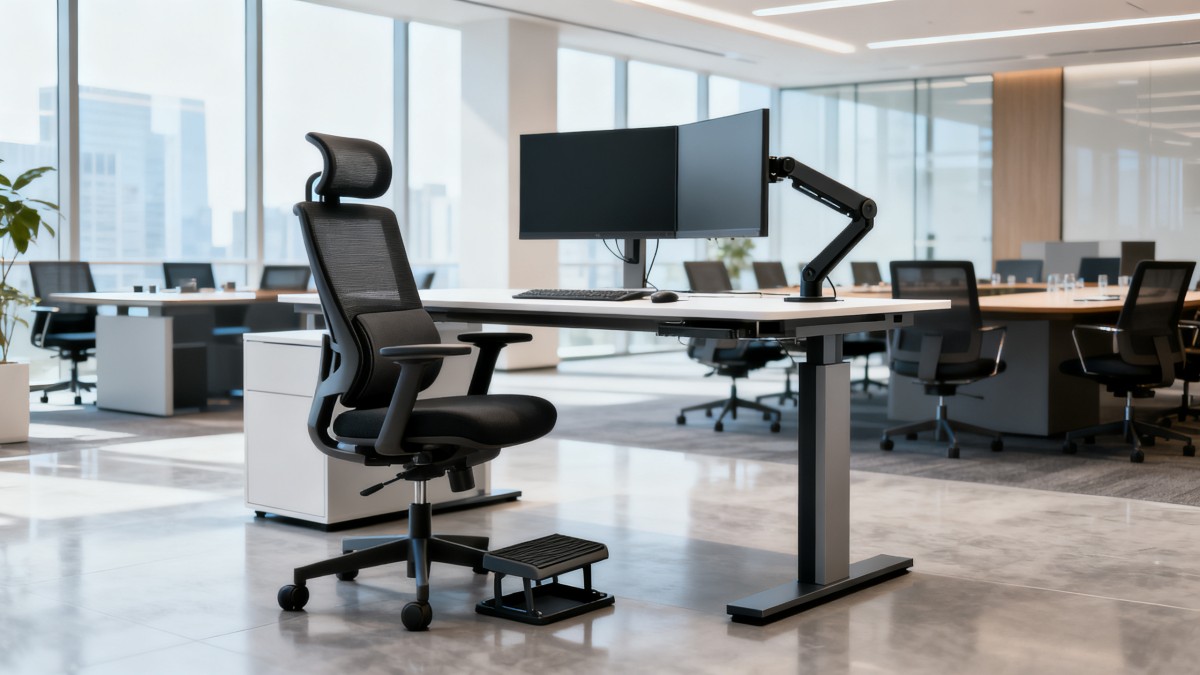
Posture support office furniture has moved beyond a wellness discussion. It now affects uptime, focus, space planning, and the long-term quality of workplace investment.
That shift is easy to understand. Workstations are used for longer sessions, teams expect better comfort, and commercial interiors are judged on both performance and brand experience.
In practice, poor seating and weak desk design create small losses that add up. People reposition constantly, complain sooner, and use spaces less effectively.
Better posture support office furniture helps reduce those frictions. It supports a more stable sitting posture, easier movement, and better alignment between user, chair, desk, and screen.
The bigger point is not luxury. It is measurable workplace performance. Comfort influences concentration, attendance patterns, and how often furniture needs replacement or adjustment.
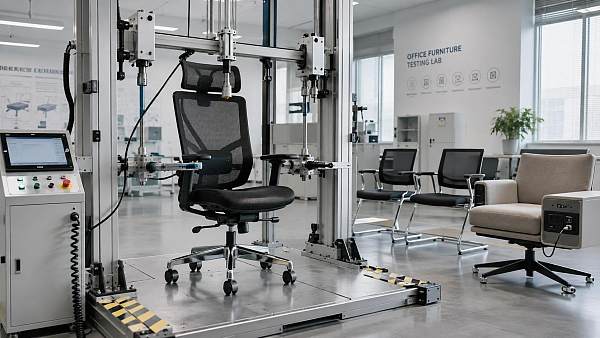
This is also where benchmarking matters. Platforms such as G-BCE track commercial furniture performance against standards like BIFMA, UL, and CE, helping buyers separate engineering value from showroom language.
So when people ask what actually improves comfort, the useful answer is rarely one feature. It is the interaction between support, adjustability, materials, and fit for the intended workspace.
What actually counts as posture support office furniture?
The phrase sounds broad, and that is part of the confusion. Posture support office furniture usually includes task chairs, sit-stand desks, monitor arms, keyboard positioning, and foot support options.
A chair alone cannot fix posture. If the desk is too high, the monitor too low, or the seat pan too deep, discomfort returns quickly.
The most reliable posture support office furniture systems are designed as a workstation ecosystem. Each component should help users maintain neutral joints without forcing a rigid pose.
That distinction matters because comfort is dynamic. Good posture is not frozen upright sitting. It is supported variation, where the body can change position without losing alignment.
A useful way to judge claims is to ask whether the product improves one of four things:
- pelvic and lower back support during long sitting periods
- arm and shoulder relaxation while typing or reading
- visual alignment between eyes and screen height
- easy movement between seated and standing work
If a product does not improve one of those outcomes, its posture benefit may be more marketing than function.
Which chair and desk features improve comfort, and which are often overstated?
This is usually the central question. Some features have clear ergonomic value. Others look impressive in catalogs but make little difference in day-to-day use.
The most important chair features are adjustable lumbar support, seat height range, seat depth adjustment, backrest recline tension, and armrests that move in several directions.
For desks, height adjustability matters most. A sit-stand desk is useful when it has stable lifting columns, suitable speed, quiet operation, and memory presets that people actually use.
Material quality also affects comfort more than many expect. Foam density, mesh tension, edge softness, and tabletop stability change how a workstation feels after several hours, not just five minutes.
More commonly overstated features include oversized headrests, decorative contouring, and fixed “ergonomic” curves that do not adapt to different body types.
The table below helps separate high-value posture support office furniture features from features that need closer scrutiny.
In short, adjustability usually beats visual complexity. Posture support office furniture should fit a range of users, not just a showroom demonstration.
Is expensive posture support office furniture always better?
Not necessarily. Higher price can reflect stronger mechanisms, better warranty terms, cleaner materials, or verified testing. It can also reflect branding, import layers, or cosmetic detailing.
A more useful comparison looks at lifecycle value. How long will the chair remain adjustable, stable, and quiet under real commercial use?
For posture support office furniture, the cost question should include maintenance, part replacement, assembly consistency, and user adoption. Cheap products often fail in those areas first.
At the same time, overspecifying furniture for light-use spaces can waste budget. A private focus room and a shared touchdown area rarely need the same support profile.
This is where commercial benchmarking becomes practical. G-BCE’s cross-sector approach is useful because furniture decisions rarely sit alone. They connect to layout efficiency, lighting conditions, digital workflow, and sustainability targets.
The better question is not “What is the premium model?” It is “Which posture support office furniture specification matches this use case with acceptable durability and measurable comfort?”
Where do companies get posture support office furniture decisions wrong?
The most common mistake is buying for average users. Real offices contain different heights, work habits, clothing types, and task patterns. Average specifications often fit no one especially well.
Another mistake is judging comfort too quickly. A chair that feels soft for ten minutes may create fatigue after two hours. Short trials can distort decisions.
There is also a planning error that shows up often in multi-site projects. Teams standardize finishes and dimensions before confirming ergonomic ranges and compliance details.
That creates avoidable risk, especially across regions with different certification expectations, user demographics, and climate conditions that affect materials and wear.
A few warning signs usually appear before a poor rollout:
- chairs are selected without desk and monitor review
- spec sheets mention “ergonomic” but omit testing standards
- pilot users are too narrow a group
- replacement parts and service response are unclear
- sustainability claims are broad but unsupported
In actual sourcing, posture support office furniture works best when it is treated as infrastructure. That means measurable criteria, pilot testing, and standard verification before scaling.
How should posture support office furniture be evaluated before rollout?
A practical evaluation starts with tasks, not products. Screen-based focus work, hybrid meetings, collaborative benches, and reception back-office areas all place different demands on posture support.
Then look at fit range. A good chair should serve a broad user population without requiring complicated adjustment instructions every time someone sits down.
Testing should cover at least one full work cycle. Comfort scores after brief showroom use are less meaningful than observations after repeated task switching and extended sitting.
Need-to-check criteria usually include the following:
- certification and benchmark alignment, including BIFMA where relevant
- adjustment range, ease of use, and mechanism reliability
- surface durability, cleanability, and acoustic impact
- part availability, warranty clarity, and installation consistency
- compatibility with monitors, power access, and space density
For international projects, a structured benchmark source is especially helpful. G-BCE’s value is that it frames posture support office furniture within a larger commercial ecosystem, not as an isolated purchase decision.
That broader lens often reveals hidden issues early, such as cable routing conflicts, packaging waste, inconsistent assembly, or mismatch between local supply and design intent.
So what is the smartest next step if comfort is the goal?
Start by defining where discomfort is happening now. Is it prolonged sitting, screen height, shared desks, limited adjustability, or fast furniture wear?
From there, compare posture support office furniture options as complete workstation systems rather than standalone chairs. That produces clearer decisions and fewer performance gaps later.
The strongest results usually come from a short pilot, a fit-range checklist, and a benchmark review against recognized standards and commercial use conditions.
What actually improves comfort is rarely a trendy feature. It is the combination of adjustability, verified build quality, user fit, and alignment with the real tasks performed in the space.
When posture support office furniture is evaluated that way, the investment becomes easier to defend. It supports better working conditions while also strengthening operational resilience and space quality.
A sensible next move is to document current pain points, rank critical ergonomic criteria, and compare shortlisted solutions against durability, compliance, and rollout practicality before making a final specification.
News Recommendations
 How energy-efficient design reduces operating costs in retail lighting
![51a6ab95581761cc26f4318be6520c15]()
Aris Katos
Future of Carbide Coatings
 When commercial aluminum storefronts make sense for a retail renovation
![51a6ab95581761cc26f4318be6520c15]()
Aris Katos
Future of Carbide Coatings
 What makes LED lights durable in high-use commercial spaces?
![51a6ab95581761cc26f4318be6520c15]()
Aris Katos
Future of Carbide Coatings
 Which industry categories offer the strongest export potential in Latin America?
![51a6ab95581761cc26f4318be6520c15]()
Aris Katos
Future of Carbide Coatings
 How to choose an ultra bright waterproof window display for storefronts
![51a6ab95581761cc26f4318be6520c15]()
Aris Katos
Future of Carbide Coatings
 How to verify suppliers on a trade portal for global sourcing
![51a6ab95581761cc26f4318be6520c15]()
Aris Katos
Future of Carbide Coatings
 How RoHS requirements should be stated in product specifications
![51a6ab95581761cc26f4318be6520c15]()
Aris Katos
Future of Carbide Coatings
 What affects the lead time for custom retail counter displays?
![51a6ab95581761cc26f4318be6520c15]()
Aris Katos
Future of Carbide Coatings
 What consumer packaging USA importers need to verify before ordering
![51a6ab95581761cc26f4318be6520c15]()
Aris Katos
Future of Carbide Coatings
 How commercial spaces interiors shape customer dwell time
![51a6ab95581761cc26f4318be6520c15]()
Aris Katos
Future of Carbide Coatings
 How LED commercial lighting design reduces glare in retail spaces
![51a6ab95581761cc26f4318be6520c15]()
Aris Katos
Future of Carbide Coatings
 How industrial technology information improves RFID inventory accuracy
![51a6ab95581761cc26f4318be6520c15]()
Aris Katos
Future of Carbide Coatings
 When drip garden watering systems make more sense than sprinklers
![51a6ab95581761cc26f4318be6520c15]()
Aris Katos
Future of Carbide Coatings
 When category comparison improves sourcing for industrial applications
![51a6ab95581761cc26f4318be6520c15]()
Aris Katos
Future of Carbide Coatings
 Industrial application guidance for selecting the right LED lighting
![51a6ab95581761cc26f4318be6520c15]()
Aris Katos
Future of Carbide Coatings
 Which commercial architecture standards apply to European retail fit-outs?
![51a6ab95581761cc26f4318be6520c15]()
Aris Katos
Future of Carbide Coatings
 How to verify FDA requirements for maternity care products
![51a6ab95581761cc26f4318be6520c15]()
Aris Katos
Future of Carbide Coatings
 How to verify BPA-free claims for food-contact products
![51a6ab95581761cc26f4318be6520c15]()
Aris Katos
Future of Carbide Coatings
 When does a European wholesale supplier suit modular office projects?
![51a6ab95581761cc26f4318be6520c15]()
Aris Katos
Future of Carbide Coatings
 When consumer ecosystem solutions improve the in-store shopping journey
![51a6ab95581761cc26f4318be6520c15]()
Aris Katos
Future of Carbide Coatings
 How a commercial developers network can reduce site selection risk
![51a6ab95581761cc26f4318be6520c15]()
Aris Katos
Future of Carbide Coatings
 How clear purchasing specifications prevent costly supplier deviations
![51a6ab95581761cc26f4318be6520c15]()
Aris Katos
Future of Carbide Coatings
 What an ISTA drop test lab checks before your packaging ships
![51a6ab95581761cc26f4318be6520c15]()
Aris Katos
Future of Carbide Coatings
 Which commercial furniture standards apply to workplace seating?
![51a6ab95581761cc26f4318be6520c15]()
Aris Katos
Future of Carbide Coatings
 How to evaluate smart lighting module OEM compatibility before sampling
![51a6ab95581761cc26f4318be6520c15]()
Aris Katos
Future of Carbide Coatings
 How to assess whether sustainable technology delivers real impact
![51a6ab95581761cc26f4318be6520c15]()
Aris Katos
Future of Carbide Coatings
 How to assess an OEM supplier’s quality control before ordering
![51a6ab95581761cc26f4318be6520c15]()
Aris Katos
Future of Carbide Coatings
 How consumer ecosystem solutions data can improve retail personalization
![51a6ab95581761cc26f4318be6520c15]()
Aris Katos
Future of Carbide Coatings
 When does consumer packaging design justify a higher product price?
![51a6ab95581761cc26f4318be6520c15]()
Aris Katos
Future of Carbide Coatings
 Supermarket Fixture Installation: Planning Layouts, Wiring, and Handover
![51a6ab95581761cc26f4318be6520c15]()
Aris Katos
Future of Carbide Coatings
 Automated Lighting and Smart Lighting Control in Bergerac: Key Project Considerations
![51a6ab95581761cc26f4318be6520c15]()
Aris Katos
Future of Carbide Coatings
 Segment Streetlight Controllers: Choosing Control Modes for Urban Roads
![51a6ab95581761cc26f4318be6520c15]()
Aris Katos
Future of Carbide Coatings
 IEC 62471-2 Explained: How to Assess Photobiological Risks in LED Lighting
![51a6ab95581761cc26f4318be6520c15]()
Aris Katos
Future of Carbide Coatings
 Food Grade Packaging Requirements by Product Type, Temperature, and Contact Risk
![51a6ab95581761cc26f4318be6520c15]()
Aris Katos
Future of Carbide Coatings
 Food Packaging Compliance Checklist: Tests, Records, and Labeling Before Shipment
![51a6ab95581761cc26f4318be6520c15]()
Aris Katos
Future of Carbide Coatings
 NSF Food Packaging Standards: When Certification Matters for Commercial Food Use
![51a6ab95581761cc26f4318be6520c15]()
Aris Katos
Future of Carbide Coatings
 FDA Food Grade Compliance: Which Materials and Documents Do Buyers Need?
![51a6ab95581761cc26f4318be6520c15]()
Aris Katos
Future of Carbide Coatings
 What Should a Food Grade Declaration Include for Packaging Compliance?
![51a6ab95581761cc26f4318be6520c15]()
Aris Katos
Future of Carbide Coatings
 Housewares Importing: How to Evaluate Suppliers, Costs, and Compliance Risks
![51a6ab95581761cc26f4318be6520c15]()
Aris Katos
Future of Carbide Coatings