Kiosk Touch Screen Sensitivity Metrics That Actually Affect User Experience
Time
Click Count
For project managers and engineering leads, understanding kiosk touch screen sensitivity metrics is critical to delivering reliable self-service experiences at scale. Beyond specs on paper, these metrics directly influence response accuracy, user frustration, maintenance frequency, and deployment success in demanding commercial environments. This guide highlights the sensitivity factors that truly affect real-world performance and smarter procurement decisions.
Why sensitivity requirements change by deployment scenario
Not every kiosk fails for the same reason, and not every touch panel needs the same tuning. A self-check-in terminal in a hotel lobby, a wayfinding unit in a shopping mall, a food ordering kiosk in a quick-service restaurant, and an industrial visitor management station all operate under different patterns of touch behavior, user patience, cleaning cycles, lighting conditions, and enclosure constraints. That is why kiosk touch screen sensitivity metrics should never be evaluated in isolation.
For project teams, the practical question is not simply whether a screen is “sensitive enough.” The better question is whether sensitivity performance matches the operating environment, the expected user profile, and the business risk of missed or false inputs. In commercial spaces, a screen that feels too slow, too eager, or too inconsistent can create queues, increase staff intervention, and undermine trust in self-service.
Within the broader Global Business & Consumer Ecosystem, this matters because touch interaction is not just a hardware detail. It connects commercial furniture integration, smart retail technology performance, maintenance workflows, and even sourcing standards. A kiosk may meet baseline electrical compliance, but still disappoint in real-world user experience if the wrong sensitivity profile is selected for the site.
The kiosk touch screen sensitivity metrics that actually affect user experience
When buyers review kiosk touch screen sensitivity metrics, several numbers appear repeatedly. However, only a subset consistently shapes user experience in deployment. The most important metrics are usually the ones that influence recognition reliability under imperfect conditions rather than laboratory-perfect taps.
1. Touch activation threshold
This indicates how much contact or signal change is needed before the screen registers a touch. If the threshold is too high, elderly users, children, or hurried shoppers may need repeated presses. If it is too low, the screen may trigger accidental input from sleeves, moisture, cleaning residue, or edge contact. In public kiosks, balanced activation threshold is often more valuable than extreme responsiveness.
2. Response latency
Latency is the delay between contact and system recognition. Even small delays can make a kiosk feel untrustworthy, especially when visual confirmation is weak. For high-throughput environments such as transit ticketing or quick-service ordering, latency strongly affects queue speed and user confidence. It should be evaluated together with software animation speed, not as a standalone hardware claim.
3. Positional accuracy
Accuracy determines whether the touched location matches the intended interface element. This becomes critical when buttons are small, layouts are dense, or multilingual interfaces require compact design. Poor accuracy often appears first along the screen edges, where many commercial interfaces place navigation controls.
4. Multi-touch discrimination and palm rejection
In family-oriented retail or public-facing environments, users often rest a hand, hold a bag, or allow a child to touch the screen simultaneously. If the controller cannot distinguish intended touch from incidental contact, the kiosk becomes unpredictable. For maps, zoom gestures, and interactive catalogs, multi-touch quality is not optional.
5. Performance through cover glass and protective layers
Many projects add thicker glass for vandal resistance, IK impact goals, or premium appearance. But extra layers can reduce signal strength and alter touch sensitivity. One of the most overlooked kiosk touch screen sensitivity metrics is stable performance through the final enclosure stack, not the bare sensor in a supplier demo.
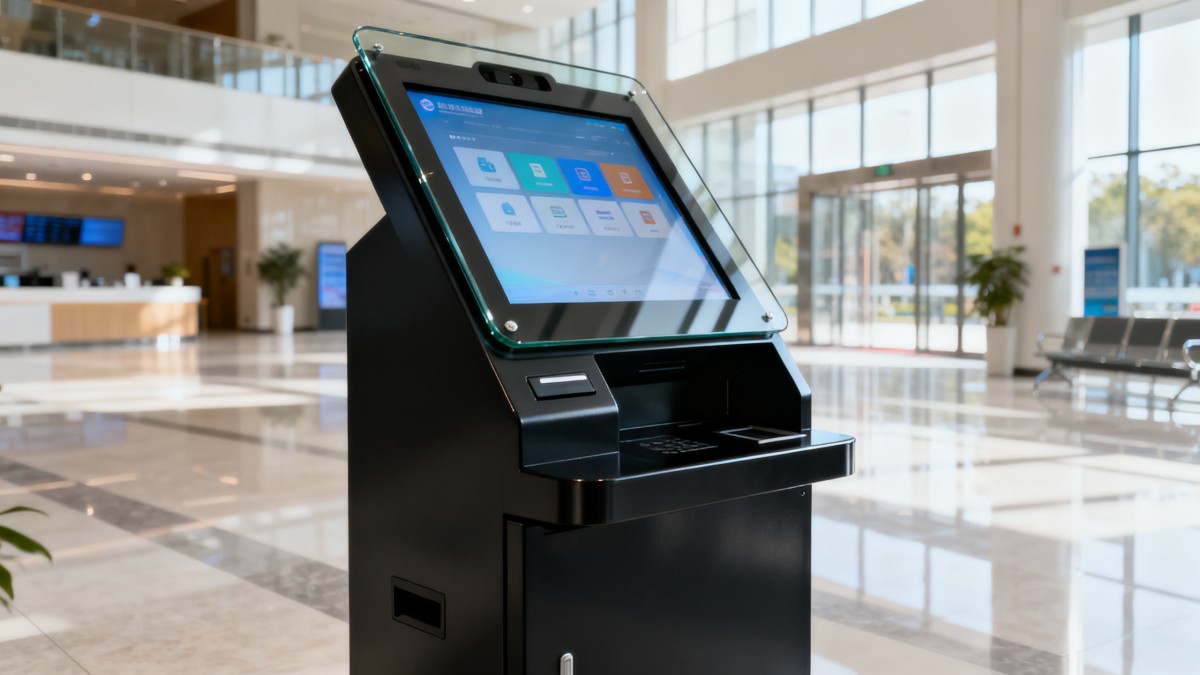
Scenario comparison: where different sensitivity priorities matter most
The table below helps project managers compare how kiosk touch screen sensitivity metrics shift across common commercial scenarios. This is where procurement decisions become more precise.
How common application scenarios change what you should test
High-traffic retail and food service
In these environments, users are often impatient, distracted, and physically close to one another. Screens are touched quickly and repeatedly, sometimes with wet fingers, oily residue, or shopping bags brushing the panel. Here, kiosk touch screen sensitivity metrics should be judged for speed consistency under contamination, not just ideal bare-finger response. Engineering teams should test repeated order flows, rapid menu switching, and accidental edge contact.
Corporate, hospitality, and premium brand environments
These projects typically prioritize polished user experience and visual integration with high-end interiors. The challenge is that thick cover glass, anti-glare treatments, and refined enclosure materials may alter touch behavior. In these settings, sensitivity should support confidence and elegance: no heavy pressing, no second attempts, and no visible mismatch between touch point and UI response. The screen must feel intentional, not merely functional.
Healthcare, public services, and accessibility-sensitive settings
Users may have limited dexterity, reduced confidence with digital interfaces, or need extra time to complete forms. A screen tuned too aggressively can register unintended contact, while one tuned too conservatively can fail to recognize light touches. For these scenarios, the right kiosk touch screen sensitivity metrics include activation tolerance, dwell stability, and repeatability after frequent disinfectant cleaning.
Outdoor or semi-outdoor installations
Temperature variation, glare, water droplets, dust, and protective housing all influence touch performance. In these cases, environmental compensation matters as much as raw sensitivity. Teams should verify operation during actual weather cycles or simulated exposure. A controller that performs well indoors may become unstable when enclosure heat buildup and surface moisture interact.
What project managers should ask suppliers before approving a touchscreen
Many vendor datasheets present kiosk touch screen sensitivity metrics as fixed achievements, but in practice they depend on controller tuning, firmware, enclosure design, and use case assumptions. Procurement teams should push beyond generic statements such as “high sensitivity” or “industrial-grade touch.”
- Was the quoted sensitivity measured with the final cover glass thickness and bonding structure?
- How does touch accuracy change near edges and corners?
- Can the controller be tuned for gloves, moisture rejection, or heavy cleaning cycles?
- What is the tested latency under the actual operating system and application stack?
- How many false touches were observed during contamination or endurance tests?
- Does performance drift after prolonged use, thermal stress, or adhesive aging?
These questions support better alignment between sourcing, engineering validation, and site operations. For organizations managing international rollouts, they also help compare suppliers against standards-driven expectations rather than marketing language.
Common scenario-level mistakes when evaluating kiosk touch screen sensitivity metrics
Mistake 1: choosing the most sensitive option by default
Higher sensitivity is not always better. Overly eager touch response can increase accidental input, especially in narrow kiosks, child-accessible areas, or cleaning-intensive sites. Good user experience comes from controlled recognition, not maximum trigger ease.
Mistake 2: validating only with internal staff
Internal teams already understand the interface and interact carefully. Public users do not. Real deployment tests should include first-time users, different age groups, variable hand conditions, and rushed interactions. This is often where meaningful kiosk touch screen sensitivity metrics become visible.
Mistake 3: ignoring the impact of industrial design decisions
Bezel depth, glass thickness, anti-smudge coatings, and mounting pressure can all affect touch behavior. A strong industrial design concept must be validated as a complete system. Otherwise, teams approve a beautiful kiosk that underperforms at the point of interaction.
Mistake 4: separating touch evaluation from maintenance planning
Sensitivity stability over time matters just as much as day-one feel. Frequent cleaning agents, UV exposure, and public wear change the user experience gradually. Operators should ask how touch quality is preserved over months of real use, not just at factory acceptance.
A practical decision framework for scenario-fit selection
A useful way to evaluate kiosk touch screen sensitivity metrics is to rank the project against four factors: interaction speed, user diversity, environmental stress, and enclosure complexity. If interaction speed is high, prioritize latency and repeated-tap stability. If user diversity is high, prioritize balanced activation threshold and accessibility-friendly accuracy. If environmental stress is high, prioritize moisture rejection and thermal stability. If enclosure complexity is high, insist on testing through the final material stack.
This approach helps engineering leads avoid one-size-fits-all purchasing. It also supports more productive discussions with suppliers across smart retail technology, commercial hardware integration, and long-term operational benchmarking.
FAQ: scenario-based questions buyers often ask
Are kiosk touch screen sensitivity metrics more important for indoor or outdoor kiosks?
They are important for both, but outdoor and semi-outdoor kiosks usually require more environmental validation. Indoor projects fail more often from poor UX tuning, while outdoor projects fail from changing conditions affecting recognition consistency.
Should project teams prioritize latency or accuracy?
That depends on the scenario. Fast-service and ticketing projects usually feel pain from latency first. Wayfinding, registration, and data-entry flows often suffer more from poor positional accuracy. The right answer is scenario-specific, not universal.
Can software design reduce sensitivity problems?
Yes, but only partially. Larger touch targets, stronger visual feedback, and cleaner interaction logic improve usability. Still, software cannot fully compensate for unstable kiosk touch screen sensitivity metrics caused by weak hardware tuning or an unsuitable enclosure stack.
Conclusion: match the metric to the moment of use
The most valuable kiosk touch screen sensitivity metrics are the ones that predict how the screen behaves in the exact moment a real user needs it: during a rush, in poor weather, after repeated cleaning, behind thick glass, or under accessibility demands. For project managers and engineering leads, the best procurement decision is rarely the screen with the strongest generic specification. It is the one validated for the actual scenario, interface flow, and commercial environment.
If your team is comparing vendors or planning a rollout, define the operating scenario first, then test sensitivity performance against that reality. This is the most reliable way to reduce deployment risk, improve user satisfaction, and build more resilient self-service infrastructure across modern commercial ecosystems.
News Recommendations
 How to choose an ultra bright waterproof window display for storefronts
![51a6ab95581761cc26f4318be6520c15]()
Aris Katos
Future of Carbide Coatings
 How to verify suppliers on a trade portal for global sourcing
![51a6ab95581761cc26f4318be6520c15]()
Aris Katos
Future of Carbide Coatings
 How RoHS requirements should be stated in product specifications
![51a6ab95581761cc26f4318be6520c15]()
Aris Katos
Future of Carbide Coatings
 What affects the lead time for custom retail counter displays?
![51a6ab95581761cc26f4318be6520c15]()
Aris Katos
Future of Carbide Coatings
 What consumer packaging USA importers need to verify before ordering
![51a6ab95581761cc26f4318be6520c15]()
Aris Katos
Future of Carbide Coatings
 How commercial spaces interiors shape customer dwell time
![51a6ab95581761cc26f4318be6520c15]()
Aris Katos
Future of Carbide Coatings
 How LED commercial lighting design reduces glare in retail spaces
![51a6ab95581761cc26f4318be6520c15]()
Aris Katos
Future of Carbide Coatings
 How industrial technology information improves RFID inventory accuracy
![51a6ab95581761cc26f4318be6520c15]()
Aris Katos
Future of Carbide Coatings
 When drip garden watering systems make more sense than sprinklers
![51a6ab95581761cc26f4318be6520c15]()
Aris Katos
Future of Carbide Coatings
 When category comparison improves sourcing for industrial applications
![51a6ab95581761cc26f4318be6520c15]()
Aris Katos
Future of Carbide Coatings
 Industrial application guidance for selecting the right LED lighting
![51a6ab95581761cc26f4318be6520c15]()
Aris Katos
Future of Carbide Coatings
 Which commercial architecture standards apply to European retail fit-outs?
![51a6ab95581761cc26f4318be6520c15]()
Aris Katos
Future of Carbide Coatings
 How to verify FDA requirements for maternity care products
![51a6ab95581761cc26f4318be6520c15]()
Aris Katos
Future of Carbide Coatings
 How to verify BPA-free claims for food-contact products
![51a6ab95581761cc26f4318be6520c15]()
Aris Katos
Future of Carbide Coatings
 When does a European wholesale supplier suit modular office projects?
![51a6ab95581761cc26f4318be6520c15]()
Aris Katos
Future of Carbide Coatings
 When consumer ecosystem solutions improve the in-store shopping journey
![51a6ab95581761cc26f4318be6520c15]()
Aris Katos
Future of Carbide Coatings
 How a commercial developers network can reduce site selection risk
![51a6ab95581761cc26f4318be6520c15]()
Aris Katos
Future of Carbide Coatings
 How clear purchasing specifications prevent costly supplier deviations
![51a6ab95581761cc26f4318be6520c15]()
Aris Katos
Future of Carbide Coatings
 What an ISTA drop test lab checks before your packaging ships
![51a6ab95581761cc26f4318be6520c15]()
Aris Katos
Future of Carbide Coatings
 Which commercial furniture standards apply to workplace seating?
![51a6ab95581761cc26f4318be6520c15]()
Aris Katos
Future of Carbide Coatings
 How to evaluate smart lighting module OEM compatibility before sampling
![51a6ab95581761cc26f4318be6520c15]()
Aris Katos
Future of Carbide Coatings
 How to assess whether sustainable technology delivers real impact
![51a6ab95581761cc26f4318be6520c15]()
Aris Katos
Future of Carbide Coatings
 How to assess an OEM supplier’s quality control before ordering
![51a6ab95581761cc26f4318be6520c15]()
Aris Katos
Future of Carbide Coatings
 How consumer ecosystem solutions data can improve retail personalization
![51a6ab95581761cc26f4318be6520c15]()
Aris Katos
Future of Carbide Coatings
 When does consumer packaging design justify a higher product price?
![51a6ab95581761cc26f4318be6520c15]()
Aris Katos
Future of Carbide Coatings
 Supermarket Fixture Installation: Planning Layouts, Wiring, and Handover
![51a6ab95581761cc26f4318be6520c15]()
Aris Katos
Future of Carbide Coatings
 Automated Lighting and Smart Lighting Control in Bergerac: Key Project Considerations
![51a6ab95581761cc26f4318be6520c15]()
Aris Katos
Future of Carbide Coatings
 Segment Streetlight Controllers: Choosing Control Modes for Urban Roads
![51a6ab95581761cc26f4318be6520c15]()
Aris Katos
Future of Carbide Coatings
 IEC 62471-2 Explained: How to Assess Photobiological Risks in LED Lighting
![51a6ab95581761cc26f4318be6520c15]()
Aris Katos
Future of Carbide Coatings
 Food Grade Packaging Requirements by Product Type, Temperature, and Contact Risk
![51a6ab95581761cc26f4318be6520c15]()
Aris Katos
Future of Carbide Coatings
 Food Packaging Compliance Checklist: Tests, Records, and Labeling Before Shipment
![51a6ab95581761cc26f4318be6520c15]()
Aris Katos
Future of Carbide Coatings
 NSF Food Packaging Standards: When Certification Matters for Commercial Food Use
![51a6ab95581761cc26f4318be6520c15]()
Aris Katos
Future of Carbide Coatings
 FDA Food Grade Compliance: Which Materials and Documents Do Buyers Need?
![51a6ab95581761cc26f4318be6520c15]()
Aris Katos
Future of Carbide Coatings
 What Should a Food Grade Declaration Include for Packaging Compliance?
![51a6ab95581761cc26f4318be6520c15]()
Aris Katos
Future of Carbide Coatings
 Housewares Importing: How to Evaluate Suppliers, Costs, and Compliance Risks
![51a6ab95581761cc26f4318be6520c15]()
Aris Katos
Future of Carbide Coatings
 Why Freeze-Dried Fruit Ingredients Lose Crispness—and How to Prevent It
![51a6ab95581761cc26f4318be6520c15]()
Aris Katos
Future of Carbide Coatings
 What industry veterans look for before choosing a new supplier
![51a6ab95581761cc26f4318be6520c15]()
Aris Katos
Future of Carbide Coatings
 How material fatigue can shorten the service life of retail shelving
![51a6ab95581761cc26f4318be6520c15]()
Aris Katos
Future of Carbide Coatings
 What makes a global sourcing platform reliable for supplier verification?
![51a6ab95581761cc26f4318be6520c15]()
Aris Katos
Future of Carbide Coatings