Commercial Environments Planning for Better Self-Service Kiosk Flow
Time
Click Count
Effective commercial environments planning is essential to creating self-service kiosk areas that feel intuitive for both users and operators. From layout logic and traffic flow to accessibility, durability, and digital integration, every detail shapes the customer experience and operational efficiency. This article explores how smarter spatial strategies can reduce friction, improve engagement, and support high-performance commercial environments.
Why commercial environments planning matters for self-service kiosk flow
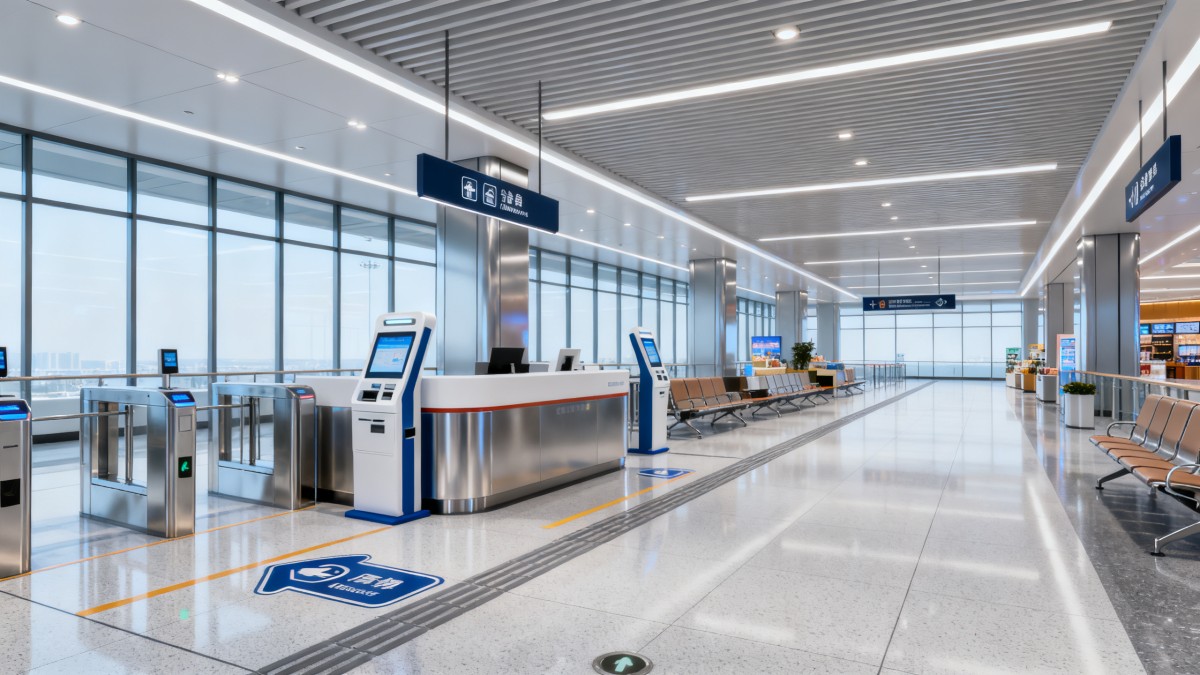
In many retail, hospitality, transport, healthcare, and mixed-use locations, a kiosk is treated as a device problem rather than a space problem. That is where many deployments fail. The screen may be fast, the software may be stable, and the enclosure may meet durability targets, yet the user journey still breaks down because the surrounding environment was not planned with enough precision.
Good commercial environments planning connects physical layout, digital touchpoints, queue behavior, lighting conditions, signage visibility, maintenance access, and product supply chain realities. For operators, that means fewer service interruptions, cleaner circulation paths, lower staff intervention, and more predictable throughput during peak periods.
For users, the benefits are equally practical. They need to see the kiosk, approach it without confusion, understand where to stand, complete a transaction quickly, and exit without crossing into incoming traffic. If any of these steps feel uncertain, transaction abandonment rises and staff are pulled away from other tasks.
- Poor placement creates hesitation, especially when kiosks compete with displays, columns, promotional islands, or checkout lines.
- Weak traffic design causes users to cluster in front of screens, blocking passersby and reducing store comfort.
- Limited service access forces operators to shut down nearby areas for maintenance, increasing disruption and labor cost.
- Insufficient integration with lighting, furniture, power, and signage reduces both discoverability and transaction confidence.
This is why G-BCE approaches kiosk planning as part of a larger commercial ecosystem. Through cross-sector benchmarking across commercial furniture, smart retail technology, signage, and supply chain performance, the platform helps teams evaluate not just the kiosk itself, but the operational environment that allows it to perform consistently.
What operators should map before choosing kiosk locations
Before selecting hardware or approving floor plans, operators should define how people actually move through the site. Commercial environments planning works best when placement is based on observed circulation rather than assumed customer behavior. A kiosk near the entrance may look strategic, but if users stop there and create a bottleneck, that location damages the overall journey.
Core flow factors to assess
- Entry velocity: Are people entering quickly, pausing, or browsing? Fast-moving entrances often need deeper kiosk placement.
- Decision complexity: A simple check-in or ticket print requires less dwell space than a customized order or account update.
- Queue spillover: Where will waiting users stand, and will that interfere with aisles, merchandise, or emergency routes?
- Exit direction: Can users leave the kiosk zone naturally without crossing the next customer’s entry path?
- Operator access: Is there rear or side clearance for cleaning, cable checks, replacement parts, and cashless component service?
A practical mistake is placing kiosks where power is easy rather than where behavior is logical. That may simplify installation, but it often increases customer confusion. A better approach is to align architectural layout, power routing, data infrastructure, and fixture planning from the start.
Quick planning framework by environment type
The table below gives operators a simple way to match commercial environments planning decisions to real kiosk use cases across mixed industry settings.
The main lesson is that no single placement rule fits every site. Commercial environments planning should respond to transaction speed, visibility needs, privacy expectations, and maintenance realities at the same time.
How to design kiosk zones that reduce friction for users and operators
A kiosk zone performs well when it feels self-explanatory. Users should not need verbal direction for basic actions such as where to start, where to wait, and where to leave. Operators should not need to constantly correct traffic, clear obstructions, or reset user expectations. This is where layout logic and environmental details make a measurable difference.
Five design principles that improve flow
- Create a readable approach angle. Screens hidden behind promotional fixtures or placed parallel to heavy traffic are harder to notice and harder to join.
- Separate active use space from pass-through space. A user needs room to stop, focus, and interact without feeling rushed by surrounding movement.
- Plan for accessibility from the beginning. Height, reach range, wheelchair turning space, and visual clarity should be spatial requirements, not later adjustments.
- Coordinate materials with maintenance. Finishes that attract fingerprints, glare, or edge damage often increase cleaning frequency and lower perceived quality.
- Use signage as part of flow control. A kiosk area needs directional messaging, not just branding or promotional graphics.
Operators also benefit when supporting elements are benchmarked together. A kiosk base, nearby counter edge, queue post, overhead light, and floor marker all influence how the station performs. G-BCE’s cross-sector perspective is useful here because it connects furniture and fixture planning with technical hardware and signage decisions instead of treating them as separate procurement silos.
Environmental details often overlooked
Many deployment teams focus on screen size, software features, and unit cost, but operators tend to struggle later with more ordinary issues: glare from ceiling lights, unstable floor leveling, cable service difficulty, thermal load in enclosed zones, and poor cleaning access around plinths or wall-mounted housings. These factors directly affect uptime and user satisfaction.
Which kiosk layouts work best in different commercial environments planning scenarios?
There is no universal kiosk layout. The best configuration depends on transaction volume, available footprint, user familiarity, and the amount of operator support nearby. Comparing common formats helps buyers and site teams avoid overbuilding or underplanning the zone.
The comparison below can guide layout selection during commercial environments planning, especially when balancing flow efficiency, accessibility, and servicing requirements.
For operators, the key is not to chase the visually most impressive layout. The right choice is the one that matches user confidence, expected queue density, serviceability, and nearby fixture conditions. Benchmarking these decisions against international commercial fit-out expectations can prevent costly redesigns later.
Procurement and specification: what should buyers and operators prioritize?
Commercial environments planning becomes more reliable when procurement teams use a broader specification lens. The cheapest kiosk may require expensive environmental workarounds. On the other hand, a premium kiosk can underperform if the surrounding furniture, signage, lighting, or floor preparation is weak. Buyers should evaluate the total operating context, not only unit price.
Specification checklist for practical decision-making
- Footprint and clearance: Confirm approach depth, side clearance, and rear service space before selecting housing dimensions.
- Material resilience: Assess resistance to scratches, cleaning chemicals, edge impacts, and visible wear in high-contact areas.
- Display readability: Evaluate glare exposure, ambient light conditions, and the visibility of on-screen prompts from typical approach angles.
- Power and connectivity: Check whether site infrastructure supports safe routing, stable connectivity, and easy future upgrades.
- Compliance alignment: Review whether the planned solution is likely to support applicable regional requirements and reference standards such as UL, CE, or BIFMA where relevant.
- Maintenance model: Clarify who services the unit, what parts are field-replaceable, and how often access panels or consumables need attention.
G-BCE adds value in this phase by helping sourcing teams compare hardware, fixture compatibility, environmental finish expectations, and compliance considerations across international supply chains. This is especially useful for chain operators and developers who need consistency across multiple markets without ignoring local installation constraints.
A practical evaluation matrix for self-service kiosk projects
The following matrix helps operators score options during commercial environments planning and vendor review.
Using a matrix like this keeps decision-making grounded. It also prevents single-factor purchasing, where one attractive specification masks a poor fit for the actual operating environment.
Common mistakes in commercial environments planning for kiosk installations
Even experienced teams repeat a few predictable mistakes. Most of them come from treating the kiosk as a standalone object rather than part of a wider commercial system. That mindset usually increases hidden costs after launch.
Mistakes that slow adoption and raise operating cost
- Choosing a location based only on visibility, without checking queue spillover and exit flow.
- Ignoring adjacent fixtures, which can create reach conflicts, visual clutter, or maintenance obstruction.
- Underestimating cleaning and service access, especially for enclosed bases or wall-adjacent units.
- Using finishes and signage that look premium in renderings but perform poorly under heavy daily contact.
- Failing to align global sourcing choices with local compliance expectations, installation practices, and replacement part availability.
These problems are avoidable when site planning, hardware benchmarking, and supply chain thinking are connected early. That is one reason data transparency across fixtures, smart retail technology, lighting, signage, and packaging-adjacent display environments matters. It supports better decisions before capital is committed.
FAQ: practical questions operators ask about kiosk flow and planning
How do I know if a kiosk area is too crowded?
If users hesitate before joining, block passing traffic, or need staff to organize the queue, the zone is likely underplanned. In commercial environments planning, crowding is not just about how many kiosks are installed. It is about transaction time, waiting behavior, and how clearly the space separates approach, use, and exit.
Which environments need more privacy in kiosk planning?
Healthcare, financial, visitor registration, and some customer service applications usually need more visual and acoustic consideration. In those settings, staggered layouts, moderated sightlines, and careful lighting can improve comfort without eliminating self-service efficiency.
What matters more: kiosk hardware or surrounding environment?
Both matter, but poor environmental planning can undermine strong hardware much faster than most buyers expect. A durable terminal still performs poorly if glare reduces readability, floor planning causes queue conflict, or service access is blocked. The best outcomes come from evaluating device, fixture, signage, and circulation as one coordinated system.
How can multi-site operators standardize planning across regions?
Start with a core planning framework that defines transaction types, flow logic, service clearance, material expectations, and compliance checkpoints. Then adapt around local code, site geometry, and infrastructure realities. G-BCE supports this process by bridging manufacturing precision with international commercial design expectations and benchmarking against common standards such as UL, CE, and BIFMA where applicable.
Why choose us for smarter commercial environments planning
G-BCE helps operators, sourcing teams, and commercial developers make better self-service kiosk decisions by connecting layout logic with technical benchmarking and supply chain visibility. Instead of reviewing kiosks in isolation, we support a broader evaluation of fixtures, smart retail technology, lighting and signage coordination, material suitability, and international commercial expectations.
If you are planning a new kiosk area or upgrading an existing one, you can consult us on practical topics that affect project success:
- Parameter confirmation for footprint, clearance, service access, and installation compatibility
- Product and solution selection across kiosk hardware, supporting fixtures, signage, and adjacent commercial elements
- Delivery timeline review for multi-market or phased rollout projects
- Customized planning recommendations based on traffic type, brand environment, and operator workflow
- Certification and standards alignment discussions for relevant international market requirements
- Sample support and quotation communication for benchmarking, sourcing, and fit-out coordination
When commercial environments planning is handled with the right data and the right cross-sector perspective, self-service kiosks become easier to use, easier to maintain, and easier to scale. That is the foundation of a more resilient and higher-performing commercial environment.
News Recommendations
 How to choose an ultra bright waterproof window display for storefronts
![51a6ab95581761cc26f4318be6520c15]()
Aris Katos
Future of Carbide Coatings
 How to verify suppliers on a trade portal for global sourcing
![51a6ab95581761cc26f4318be6520c15]()
Aris Katos
Future of Carbide Coatings
 How RoHS requirements should be stated in product specifications
![51a6ab95581761cc26f4318be6520c15]()
Aris Katos
Future of Carbide Coatings
 What affects the lead time for custom retail counter displays?
![51a6ab95581761cc26f4318be6520c15]()
Aris Katos
Future of Carbide Coatings
 What consumer packaging USA importers need to verify before ordering
![51a6ab95581761cc26f4318be6520c15]()
Aris Katos
Future of Carbide Coatings
 How commercial spaces interiors shape customer dwell time
![51a6ab95581761cc26f4318be6520c15]()
Aris Katos
Future of Carbide Coatings
 How LED commercial lighting design reduces glare in retail spaces
![51a6ab95581761cc26f4318be6520c15]()
Aris Katos
Future of Carbide Coatings
 How industrial technology information improves RFID inventory accuracy
![51a6ab95581761cc26f4318be6520c15]()
Aris Katos
Future of Carbide Coatings
 When drip garden watering systems make more sense than sprinklers
![51a6ab95581761cc26f4318be6520c15]()
Aris Katos
Future of Carbide Coatings
 When category comparison improves sourcing for industrial applications
![51a6ab95581761cc26f4318be6520c15]()
Aris Katos
Future of Carbide Coatings
 Industrial application guidance for selecting the right LED lighting
![51a6ab95581761cc26f4318be6520c15]()
Aris Katos
Future of Carbide Coatings
 Which commercial architecture standards apply to European retail fit-outs?
![51a6ab95581761cc26f4318be6520c15]()
Aris Katos
Future of Carbide Coatings
 How to verify FDA requirements for maternity care products
![51a6ab95581761cc26f4318be6520c15]()
Aris Katos
Future of Carbide Coatings
 How to verify BPA-free claims for food-contact products
![51a6ab95581761cc26f4318be6520c15]()
Aris Katos
Future of Carbide Coatings
 When does a European wholesale supplier suit modular office projects?
![51a6ab95581761cc26f4318be6520c15]()
Aris Katos
Future of Carbide Coatings
 When consumer ecosystem solutions improve the in-store shopping journey
![51a6ab95581761cc26f4318be6520c15]()
Aris Katos
Future of Carbide Coatings
 How a commercial developers network can reduce site selection risk
![51a6ab95581761cc26f4318be6520c15]()
Aris Katos
Future of Carbide Coatings
 How clear purchasing specifications prevent costly supplier deviations
![51a6ab95581761cc26f4318be6520c15]()
Aris Katos
Future of Carbide Coatings
 What an ISTA drop test lab checks before your packaging ships
![51a6ab95581761cc26f4318be6520c15]()
Aris Katos
Future of Carbide Coatings
 Which commercial furniture standards apply to workplace seating?
![51a6ab95581761cc26f4318be6520c15]()
Aris Katos
Future of Carbide Coatings
 How to evaluate smart lighting module OEM compatibility before sampling
![51a6ab95581761cc26f4318be6520c15]()
Aris Katos
Future of Carbide Coatings
 How to assess whether sustainable technology delivers real impact
![51a6ab95581761cc26f4318be6520c15]()
Aris Katos
Future of Carbide Coatings
 How to assess an OEM supplier’s quality control before ordering
![51a6ab95581761cc26f4318be6520c15]()
Aris Katos
Future of Carbide Coatings
 How consumer ecosystem solutions data can improve retail personalization
![51a6ab95581761cc26f4318be6520c15]()
Aris Katos
Future of Carbide Coatings
 When does consumer packaging design justify a higher product price?
![51a6ab95581761cc26f4318be6520c15]()
Aris Katos
Future of Carbide Coatings
 Supermarket Fixture Installation: Planning Layouts, Wiring, and Handover
![51a6ab95581761cc26f4318be6520c15]()
Aris Katos
Future of Carbide Coatings
 Automated Lighting and Smart Lighting Control in Bergerac: Key Project Considerations
![51a6ab95581761cc26f4318be6520c15]()
Aris Katos
Future of Carbide Coatings
 Segment Streetlight Controllers: Choosing Control Modes for Urban Roads
![51a6ab95581761cc26f4318be6520c15]()
Aris Katos
Future of Carbide Coatings
 IEC 62471-2 Explained: How to Assess Photobiological Risks in LED Lighting
![51a6ab95581761cc26f4318be6520c15]()
Aris Katos
Future of Carbide Coatings
 Food Grade Packaging Requirements by Product Type, Temperature, and Contact Risk
![51a6ab95581761cc26f4318be6520c15]()
Aris Katos
Future of Carbide Coatings
 Food Packaging Compliance Checklist: Tests, Records, and Labeling Before Shipment
![51a6ab95581761cc26f4318be6520c15]()
Aris Katos
Future of Carbide Coatings
 NSF Food Packaging Standards: When Certification Matters for Commercial Food Use
![51a6ab95581761cc26f4318be6520c15]()
Aris Katos
Future of Carbide Coatings
 FDA Food Grade Compliance: Which Materials and Documents Do Buyers Need?
![51a6ab95581761cc26f4318be6520c15]()
Aris Katos
Future of Carbide Coatings
 What Should a Food Grade Declaration Include for Packaging Compliance?
![51a6ab95581761cc26f4318be6520c15]()
Aris Katos
Future of Carbide Coatings
 Housewares Importing: How to Evaluate Suppliers, Costs, and Compliance Risks
![51a6ab95581761cc26f4318be6520c15]()
Aris Katos
Future of Carbide Coatings
 Why Freeze-Dried Fruit Ingredients Lose Crispness—and How to Prevent It
![51a6ab95581761cc26f4318be6520c15]()
Aris Katos
Future of Carbide Coatings
 What industry veterans look for before choosing a new supplier
![51a6ab95581761cc26f4318be6520c15]()
Aris Katos
Future of Carbide Coatings
 How material fatigue can shorten the service life of retail shelving
![51a6ab95581761cc26f4318be6520c15]()
Aris Katos
Future of Carbide Coatings
 What makes a global sourcing platform reliable for supplier verification?
![51a6ab95581761cc26f4318be6520c15]()
Aris Katos
Future of Carbide Coatings