A Practical Commercial Optimization Guide for Scaling Digital Signage Performance
Time
Click Count
This practical commercial optimization guide helps operators scale digital signage performance with greater clarity, consistency, and measurable impact. From hardware reliability and content delivery to space integration and long-term efficiency, it highlights the core factors that improve daily operations and customer engagement. For teams managing modern commercial environments, it offers a clear starting point for smarter execution and sustained performance growth.
For most operators, the main question is not whether digital signage matters, but why performance often becomes inconsistent as networks grow. Screens that work well in one location may fail in another. Content may look strong in planning but weak in execution. Maintenance can become reactive, and operating teams may struggle to link signage activity to real commercial outcomes.
The practical answer is that scaling digital signage depends on operational discipline more than isolated technology upgrades. A strong commercial optimization guide must help teams improve uptime, content relevance, deployment consistency, and measurable return across different sites. For operators, this means focusing on the systems that support performance every day, not just the display itself.
In modern commercial environments, digital signage sits at the intersection of hardware, software, layout planning, customer flow, and team execution. When one part underperforms, the whole experience weakens. This is why operators need a commercial optimization guide that prioritizes what can be controlled, measured, standardized, and improved over time.
Where operators should start when digital signage performance needs to scale
The first step is to identify what “better performance” means in operational terms. In many organizations, digital signage goals remain too broad: improve engagement, support branding, or modernize a space. Those goals are valid, but operators need sharper definitions. Performance usually comes down to five measurable areas: screen uptime, content accuracy, playback consistency, audience relevance, and maintenance efficiency.
If a network has frequent black screens, lagging content updates, poor brightness control, or mismatched scheduling across sites, scaling will only increase those problems. Before adding more displays or more advanced features, operators should audit the current estate. A practical commercial optimization guide begins with a baseline review of device health, content workflows, location performance, and service response times.
This review should answer simple but important questions. Which screens fail most often? Which locations have weak network stability? How long does it take to replace faulty hardware? Are content changes approved and published on time? Are displays placed where customers actually look, pause, or make decisions? Operators who can answer these questions clearly are in a much stronger position to improve performance at scale.
Another useful starting point is segmentation. Not every screen serves the same purpose. Entrance displays, menu boards, queue management screens, promotional walls, and wayfinding units all have different success criteria. Treating them as one generic signage system often leads to poor optimization. Segmenting by use case allows operators to set more realistic standards for content, brightness, reliability, and update frequency.
Why hardware reliability matters more than many teams expect
When digital signage underperforms, many teams blame content first. In reality, hardware instability is often the hidden cause of weak performance. Commercial-grade displays, media players, mounts, thermal management, and power protection all influence whether content can run consistently in real environments. A beautiful campaign means little if the screen overheats, the player crashes, or the panel brightness degrades too quickly.
Operators should pay close attention to duty cycle, cooling design, panel brightness, anti-glare treatment, and remote diagnostics. These factors directly affect reliability in retail stores, transport hubs, showrooms, hospitality venues, and other demanding spaces. A practical commercial optimization guide should help teams choose hardware based on environmental conditions, not only upfront price.
Brightness is a common example. A screen that looks acceptable in a meeting room may perform poorly under storefront daylight or in a large open commercial hall. If visibility is weak, engagement drops immediately. Similarly, poor mounting quality can create alignment issues, vibration problems, or unsafe installations that increase maintenance burden over time.
Commercial operators should also assess interoperability. Hardware should integrate cleanly with content management systems, sensor tools, scheduling platforms, and remote monitoring software. Standardized equipment across sites reduces troubleshooting complexity and training time. It also improves spare-part planning and helps operators scale with less operational friction.
In environments where uptime directly affects customer communication or sales conversion, resilience should be treated as a core business requirement. Backup power planning, remote reboot capability, secure enclosures, and preventive replacement cycles can often deliver greater long-term value than chasing the lowest procurement cost.
How content operations influence real-world signage performance
Operators often assume that once a content management system is in place, content delivery will naturally stay consistent. In practice, content operations become more difficult as the network expands. Teams may face delays in approvals, inconsistent formatting, regional version errors, and scheduling conflicts across time zones or store types. These issues reduce credibility and make signage feel unmanaged.
A strong commercial optimization guide should treat content operations as a workflow challenge, not just a creative task. Operators need templates, naming rules, publishing permissions, and calendar discipline. They also need clear ownership. Who updates product promotions? Who verifies legal or pricing accuracy? Who checks whether campaigns appear correctly on the right screens at the right time?
Content should also match the context of each screen. High-traffic areas benefit from short, visually clear messages with strong hierarchy. Queue areas can support longer dwell-time content. Decision zones near checkout, service counters, or featured displays should focus on offers, instructions, or confidence-building information that helps users act. Repeating the same content everywhere wastes the flexibility of digital signage.
Another key point is content readability under real conditions. Operators should test font size, contrast, motion speed, and message density in the actual environment. A design that looks polished on a desktop preview may become unreadable from several meters away. Field testing matters because digital signage is not consumed like social media or web content. It competes with movement, noise, and limited customer attention.
For larger networks, content libraries should be structured for reuse without losing control. Operators benefit from modular assets, localized variants, and scheduling logic that can adapt by location, language, or daypart. This makes scaling more sustainable and reduces manual work while preserving quality.
What makes signage placement and space integration commercially effective
Even with reliable hardware and good content, digital signage can still underperform if placement is weak. Operators should remember that screens do not create value in isolation. They work as part of a commercial environment shaped by traffic flow, lighting, sightlines, dwell zones, and merchandising priorities. Poor placement often leads to low visibility, weak message retention, or customer confusion.
Effective space integration starts by observing how people move through a site. Where do they slow down? Where do they wait? Where do they compare options, ask for help, or decide what to buy? Signage should support these moments. Entrance displays can set expectations and announce campaigns. Wayfinding screens reduce friction. Product-focused screens can strengthen confidence at key decision points.
Operators should also watch for visual competition. If a screen is surrounded by cluttered shelving, conflicting signs, reflective surfaces, or bright ambient light, its impact will be reduced. In many cases, optimization means simplifying the area around the display, adjusting mounting height, or rethinking orientation rather than changing the message itself.
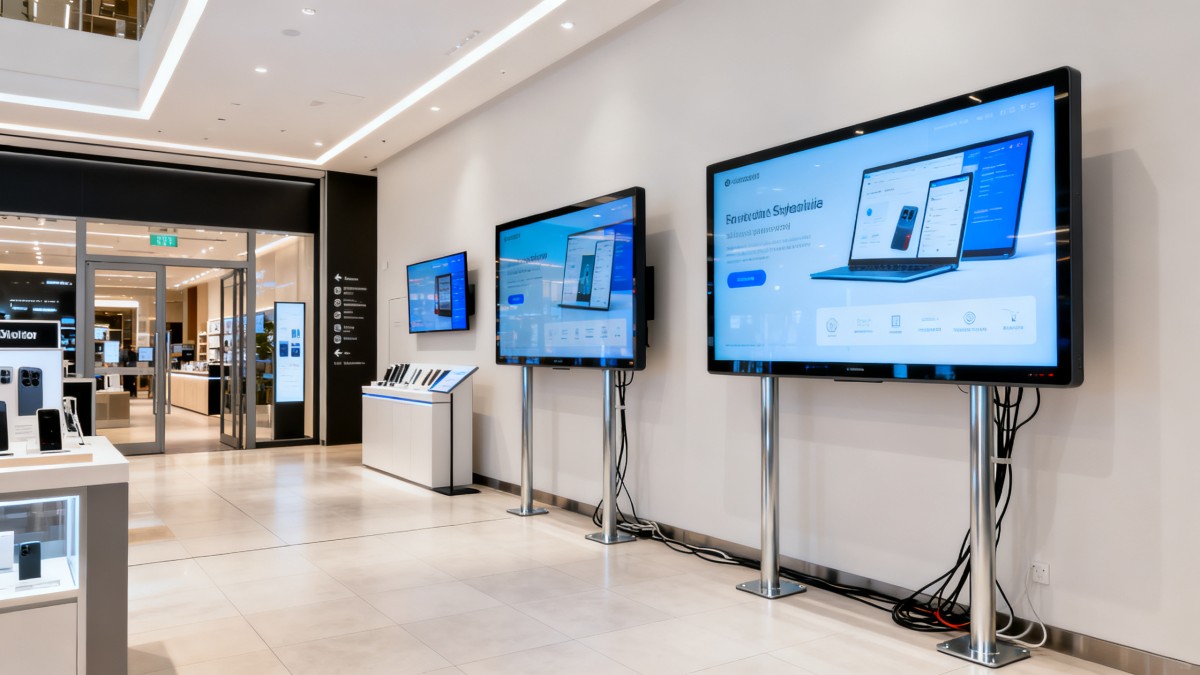
Integration with furniture, fixtures, and lighting also matters. Digital signage should feel embedded in the environment, not added as an afterthought. In premium or design-led commercial spaces, the finish quality, frame detail, cable management, and alignment with adjacent fixtures influence how credible the installation feels. A screen that functions well technically but looks poorly integrated can still weaken brand perception.
For operators managing multi-site rollouts, standard placement guidelines are essential. These should define mounting zones, viewing distances, brightness requirements, power access, and maintenance clearances. Standardization improves repeatability while still allowing local adjustments for unique architectural conditions.
How to reduce maintenance burden while improving network consistency
One of the biggest concerns for operators is the hidden cost of maintenance. As digital signage expands, small service issues multiply. A failed media player, loose cable, outdated firmware version, or incorrect schedule can trigger repeated support requests. Without a structured maintenance model, teams spend too much time reacting and too little time improving.
A practical commercial optimization guide should encourage preventive maintenance over reactive repair. Operators should monitor screen health, player status, temperature, connectivity, and content playback through centralized tools whenever possible. Alerts should be prioritized by business impact so that critical customer-facing failures are addressed first.
Remote management is especially valuable for distributed commercial networks. It reduces site visits, shortens response times, and helps teams confirm whether a problem is caused by hardware, software, power, or connectivity. Operators should build standard troubleshooting paths so frontline staff can handle simple issues safely while technical teams focus on escalations.
Documentation is another overlooked performance lever. Every site should have clear records of installed devices, serial numbers, firmware versions, network settings, mounting details, and replacement procedures. When these records are incomplete, even routine service becomes slow and expensive. Good documentation supports faster decisions and more reliable scaling.
Teams should also plan for lifecycle management. Displays, players, and accessories do not fail at the same time, but they do age in predictable ways. Operators who define refresh cycles, spare inventory levels, and support contracts in advance can avoid long periods of degraded performance. This is especially important in commercial environments where signage supports customer communication every day.
Which KPIs actually show whether optimization is working
Many organizations say they want better signage performance but track too few indicators to prove improvement. Operators need a balanced KPI set that links technical stability to commercial value. The most useful metrics usually combine reliability, operational efficiency, and audience response.
At the technical level, track uptime, incident frequency, average repair time, failed content pushes, and device compliance with approved firmware or configuration standards. These KPIs show whether the infrastructure is stable enough to support scaling.
At the operational level, monitor publishing speed, campaign accuracy, proof-of-play completion, and the labor time required for updates or issue resolution. These metrics reveal whether the system is manageable for real teams, not just technically functional in theory.
At the commercial level, measure indicators that reflect customer interaction and business outcomes. Depending on the environment, that could include dwell time, queue perception, promotion uplift, conversion support, product discovery, or reduced staff intervention. Not every result can be attributed to signage alone, but operators should still define realistic business signals and compare them across locations.
The most mature teams create performance dashboards by screen type or site category. This helps identify whether problems are isolated, systemic, or tied to specific environmental conditions. Over time, these patterns improve procurement, deployment, and content decisions. Optimization becomes more precise because it is based on evidence rather than assumptions.
How operators can build a scalable execution model across multiple locations
Scaling digital signage performance requires more than technology standards. It requires an execution model that can work across different regions, teams, and site formats. Operators need governance without unnecessary complexity. The goal is to maintain consistency while allowing enough local flexibility to stay relevant.
A useful model usually includes central standards for hardware categories, software platforms, content templates, security rules, and reporting methods. At the same time, local teams should have defined authority to manage approved content variations, timing adjustments, and on-site issue reporting. This balance reduces bottlenecks while protecting brand and operational control.
Training plays a major role here. Operators and site staff do not need to become engineers, but they do need practical knowledge. They should understand what normal performance looks like, how to identify common faults, when to escalate, and how signage supports broader commercial goals. Training is especially important when signage is part of everyday store operations rather than a separate marketing asset.
Security and compliance should also be included in the scaling model. Networked displays and media players must be protected through access control, update discipline, and secure integrations. In regulated or premium environments, operators should also verify that hardware and electrical components align with relevant commercial standards and local installation requirements.
Finally, continuous improvement should be built into the operating rhythm. Quarterly reviews of top incidents, underperforming locations, content effectiveness, and hardware reliability can reveal where optimization efforts should focus next. This prevents signage networks from becoming static and gradually less effective.
Conclusion: a commercial optimization guide should make scaling simpler, not more complicated
For operators, scaling digital signage performance is not about adding more screens as quickly as possible. It is about creating a system that remains reliable, relevant, and manageable as commercial demands grow. The most effective commercial optimization guide helps teams focus on what drives outcomes in the field: dependable hardware, disciplined content workflows, smart placement, efficient maintenance, and meaningful KPIs.
When these elements are aligned, digital signage becomes more than a display network. It becomes a practical operating tool that supports customer engagement, space efficiency, and stronger commercial execution. That is the real value of optimization: not complexity for its own sake, but clearer control, better consistency, and sustained performance across modern commercial environments.
News Recommendations
 Report: Global Kraft Paper Market Forecast to Reach $20.5 Billion by 2033
![51a6ab95581761cc26f4318be6520c15]()
Aris Katos
Future of Carbide Coatings
 How to verify Zigbee compatibility when sourcing lighting sensors
![51a6ab95581761cc26f4318be6520c15]()
Aris Katos
Future of Carbide Coatings
 How do packaging customization options affect minimum order quantities in Europe?
![51a6ab95581761cc26f4318be6520c15]()
Aris Katos
Future of Carbide Coatings
 Transom to Acquire Cree LED in Commercial Lighting Ownership Change
![51a6ab95581761cc26f4318be6520c15]()
Aris Katos
Future of Carbide Coatings
 How to plan customer flow in commercial design planning
![51a6ab95581761cc26f4318be6520c15]()
Aris Katos
Future of Carbide Coatings
 USTR Urged to Permanently Suspend Fees on China-Linked Ships
![51a6ab95581761cc26f4318be6520c15]()
Aris Katos
Future of Carbide Coatings
 How to choose comparable stores for retail benchmarking
![51a6ab95581761cc26f4318be6520c15]()
Aris Katos
Future of Carbide Coatings
 How does anchoring affect modular building wind load resistance?
![51a6ab95581761cc26f4318be6520c15]()
Aris Katos
Future of Carbide Coatings
 Amazon Raises European FBA Surcharge to 2% in Ten Markets From November 2
![51a6ab95581761cc26f4318be6520c15]()
Aris Katos
Future of Carbide Coatings
 How to verify a BPA-free test report for baby products
![51a6ab95581761cc26f4318be6520c15]()
Aris Katos
Future of Carbide Coatings
 China's Mandatory Classroom Lighting Standard GB 7793-2025 Takes Effect November 1
![51a6ab95581761cc26f4318be6520c15]()
Aris Katos
Future of Carbide Coatings
 How order volume affects the price of wholesale poly mailers
![51a6ab95581761cc26f4318be6520c15]()
Aris Katos
Future of Carbide Coatings
 US Imposes 50% Tariff on Certain Canadian PET Resin Imports
![51a6ab95581761cc26f4318be6520c15]()
Aris Katos
Future of Carbide Coatings
 How to read the maximum ratings in a semiconductor datasheet
![51a6ab95581761cc26f4318be6520c15]()
Aris Katos
Future of Carbide Coatings
 University of Maryland Develops Bio-Based Packaging to Extend Avocado and Cucumber Shelf Life
![51a6ab95581761cc26f4318be6520c15]()
Aris Katos
Future of Carbide Coatings
 How to verify a cookware manufacturer's induction compatibility claims
![51a6ab95581761cc26f4318be6520c15]()
Aris Katos
Future of Carbide Coatings
 Omdia Forecasts 11.6% Annual Growth in LED Display Revenue Through 2030
![51a6ab95581761cc26f4318be6520c15]()
Aris Katos
Future of Carbide Coatings
 How to verify a pulp molding packaging factory's production capacity
![51a6ab95581761cc26f4318be6520c15]()
Aris Katos
Future of Carbide Coatings
 Curion Survey: Half of Consumers Frustrated by Sustainable Packaging
![51a6ab95581761cc26f4318be6520c15]()
Aris Katos
Future of Carbide Coatings
 How to assess the credibility of market insight content
![51a6ab95581761cc26f4318be6520c15]()
Aris Katos
Future of Carbide Coatings
 US Removes 50% Additional Tariff on Selected Canadian Packaging Products
![51a6ab95581761cc26f4318be6520c15]()
Aris Katos
Future of Carbide Coatings
 Will a waterproof dimmable LED driver work with your existing dimmer?
![51a6ab95581761cc26f4318be6520c15]()
Aris Katos
Future of Carbide Coatings
 Charter Next Generation Raises Film PCR Use 30%, Advances Food-Grade Applications
![51a6ab95581761cc26f4318be6520c15]()
Aris Katos
Future of Carbide Coatings
 How to choose a dog harness and leash for a dog that pulls hard
![51a6ab95581761cc26f4318be6520c15]()
Aris Katos
Future of Carbide Coatings
 How to respect local customs when negotiating with overseas suppliers
![51a6ab95581761cc26f4318be6520c15]()
Aris Katos
Future of Carbide Coatings
 RFID Recycling Challenges Bring Paper-Based and Chipless Tags Into Focus
![51a6ab95581761cc26f4318be6520c15]()
Aris Katos
Future of Carbide Coatings
 How to choose commercial lighting for offices that reduces glare
![51a6ab95581761cc26f4318be6520c15]()
Aris Katos
Future of Carbide Coatings
 Queue Launches Fully Automated Robotic Pharmacy Kiosk for 30-Second Dispensing
![51a6ab95581761cc26f4318be6520c15]()
Aris Katos
Future of Carbide Coatings
 Can your supermarket store fixtures supplier meet your opening date?
![51a6ab95581761cc26f4318be6520c15]()
Aris Katos
Future of Carbide Coatings
 Shopify POS UI Extensions 2026-10 Adds Virtual Lists and Custom Row Templates
![51a6ab95581761cc26f4318be6520c15]()
Aris Katos
Future of Carbide Coatings
 How to assess smart office furniture suppliers’ North American support
![51a6ab95581761cc26f4318be6520c15]()
Aris Katos
Future of Carbide Coatings
 Aqara Launches Smart Lighting Range to Advance AI Spatial Intelligence
![51a6ab95581761cc26f4318be6520c15]()
Aris Katos
Future of Carbide Coatings
 How to assess demand forecasts in a lighting intelligence report
![51a6ab95581761cc26f4318be6520c15]()
Aris Katos
Future of Carbide Coatings
 Billerud推出PharmaKraft纤维基医药包装材料
![51a6ab95581761cc26f4318be6520c15]()
Aris Katos
Future of Carbide Coatings
 How to assess supplier reliability in global supply chain sourcing
![51a6ab95581761cc26f4318be6520c15]()
Aris Katos
Future of Carbide Coatings
 Omdia Forecasts 11.6% CAGR for Global LED Video Display Market in 2026–2030
![51a6ab95581761cc26f4318be6520c15]()
Aris Katos
Future of Carbide Coatings
 How to verify an LFGB testing laboratory's accreditation scope
![51a6ab95581761cc26f4318be6520c15]()
Aris Katos
Future of Carbide Coatings
 How to assess a workplace interior supplier's installation scope
![51a6ab95581761cc26f4318be6520c15]()
Aris Katos
Future of Carbide Coatings
 What records are needed for an ISO 9001 furniture factory audit?
![51a6ab95581761cc26f4318be6520c15]()
Aris Katos
Future of Carbide Coatings